



Abstract
BACKGROUND:
Numerous people use computer mice for long hours, especially in offices. Mouse users reported various pains and discomfort.
OBJECTIVE:
The study aimed to assess three types of most common mice (vertical, traditional, flat) in Iran in terms of their effects on carpal tunnel syndrome, hand discomfort, and usability.
METHODS:
The Boston Carpal Tunnel Syndrome questionnaire, the Cornell Hand Discomfort Questionnaire (CHDQ), System Usability Scale (SUS), and Workplace Ergonomic Risk Assessment (WERA) scores were used to assess vertical, traditional, and flat mice. In addition, the participant’s hand position was analyzed by observation method.
RESULTS:
Most participants had medium carpal tunnel syndrome severity; however, flat mouse users had a higher score, and the difference between mice was insignificant (p > 0.05). Most mouse users felt discomfort in their small and ring fingers, and the type of mouse significantly affected thumb discomfort level. More flat users felt Pain in the different parts of their hands. The flat mouse has the least SUS score. There was a significant difference between the three mice regarding SUS scores (p < 0.05). WERA mean values were acceptable for numerous mice. Adopting neutral wrist postures was more common among vertical, flat, and traditional mouse users, respectively; however, the flat mouse users tended to bend their fingers.
CONCLUSION:
There are differences between vertical and traditional flat mice in terms of ergonomic indicators. Although more studies are needed, it seems that vertical mice are better in some indicators.
Keywords
Introduction
Work-related musculoskeletal disorders (WMSDs) are injuries or disorders of the tendons, muscles, nerves, joints, cartilage, and spinal discs associated with exposure to workplace risk factors [1]. WMSDs are responsible for approximately 30% of all lost workdays [1]. These injuries can affect an individual’s well-being and career. Carpal tunnel syndrome (CTS) is a common upper MSDs. CTS shows itself by tingling in the fingers, numbness, and weakness in the hand [2]. Repetitive motions, force exertion, and awkward postures (when wrist and hand are not in the same line or the angle is not 180 degrees) can be the main reasons for hand injuries in workplaces [3, 4]. Put force on the upper limb and unnatural postures are the main roots of upper body MSDs and fatigue. CTS is a common disorder among occupations where the upper extremities are actively involved [5].
Recent studies have suggested that working with computer mouse tasks may cause muscle fatigue [6]. These disorders worsen when users adopt awkward or extreme wrist and forearm positions. Computer workstations have become more widespread in workplaces in recent years [1]. Correcting one’s upper posture is crucial when using a mouse, as frequent mouse use often involves sitting in a stationary position and making repetitive, small movements with the same muscles for extended periods. Various types and sizes of mice are available, including those designed for gaming, but they may not fit comfortably in all hands. If it is too small, fingers and thumb may be bunched up and close together. If only the fingertips touch the mouse, the hand and wrist are unsupported because they will adopt the extension posture. Mota-Carmona [6] showed that high-precision computer mouse tasks might lead to muscle fatigue. Hand size impacts muscular activity dynamics, superseding device geometry differences across the range of devices [7].
Mice can be evaluated by size, height, width, and angles. In a study by Jung [8], three mouse-type angles (0°, 30°, 50°) were measured. The researchers assessed the performance of the mice by measuring the completion time and errors while also measuring the angles between the top of the mouse and its surfaces.
Mice are generated in different shapes, like vertical, flat, and traditional. Many common hand problems, including Arthritis, Osteoarthritis, CTS, Ganglion cysts, and Tendon problems, can interfere with activities of daily living. Symptoms may include Pain from mild to severe, tenderness, swelling, Stiffness, limited range of motion, Tingling or numbness, throbbing, burning Pain, weakness, and ganglion cysts. There are some investigations about the relationship between using mice and hand disorders. A study by Blatter [9] showed that frequent use of computers and mice is associated with a high incidence of work-related upper limb and neck disorders and sick leave, which can cause financial pressure on companies. Anderson et al. [10] showed that the spread and occurrence of CTS in people who use the mouse at a high intensity (over 20 hours per week) are higher than in high-intensity keyboard users, while Lassen et al. [11] claim that keyboard and mouse using time can anticipate elbow, wrist, and hand pain from low exposure levels without a threshold effect. Scarlett [12] showed that using vertical mice worsens reaction time and errors compared to conventional mice by 10% and 20%, respectively. In a study by Findlater [13], performance was measured under two conditions (mouse and touchscreen input). According to the findings, using touchscreens resulted in faster performance; however, it was associated with higher errors. In another study by Gustafsson [14], productivity declined by approximately 24% when participants used the vertical mouse (slant angle) compared to conventional mice. In contrast, Hedge [15] showed that task performance was faster when using the vertical mouse than the traditional mouse. Therefore, there are some conflicting results among different studies.
Different mice may affect users’ hands because of their structure and size. The number of studies that worked on the effect of mouse use on hands is not limited. Still, there is no study to simultaneously assess the impact of mouse types on CTS severity, hand discomfort, system usability, and wrist and hand posture assessment score. For instance, in a study by Chen [16], it was recommended that the ideal wrist angle falls within the range of 20° to 30°, although the absence of EMG measurements could result in varied outcomes. The present study wants to investigate the effects of using a vertical mouse, traditional mouse, and flat mouse on hands to suggest the best mouse model and understand which mouse is more user-friendly and the effects of mouse type on tunnel carpal syndrome and hand discomfort. Therefore, the study aims to assess the impact of different mouse shapes (the most common mice in Iran) on Hand pain to make the best choice according to the negative effects of mouse and users’ satisfaction.
Method and material
Participants
The research focused on a specific workplace section and used the Cochran formula to determine the number of participants. Out of the larger group of employees in the chosen area, a total of 104 individuals took part voluntarily in the study (53 females and 51 males). The mean age of the subjects was 35.5 (range 21-56), and the mean BMI was 23.94. All participants were right-handed volunteers without particular health problems, and Cornell and the discomfort questionnaire assessed musculoskeletal disorders. The participants did not have any pain or problems in their hands. The flat mice were tested by 36 participants, the traditional mice by 35 participants, and the vertical mice by 33 participants. Hand measurements, including hand width and length, were measured by all participants to choose the right mouse (small, medium, and large) according to their hand dimensions. The small mouse was given to people with a hand length of less than 17 cm and the hand width of 7.5-8.5 cm. The Medium size mouse was given to people with a hand length of 17-20 cm and hand width of 8.5-10 cm, and finally, the large mouse was given to participants whose hand length was more than 20 cm and hand width of 10 to 11 cm.
Mouse models
We analyzed three types of common mice in three sizes according to the participants’ hand dimensions, including vertical, flat, and traditional mice (Fig. 1). The dimensions of the mice are shown in Table 1. Occupational Health Clinics published the recommended size for the mouse for Ontario Workers (OHCOW). All mice types were designed for right-handed users. The study aims to analyze the different effects of different types of mice on hand discomfort. The remarkable difference between the three mice regarding their structures and surface shape is obvious, so the hand posture differs when using different mice.

Flat mouse (A), traditional mouse (B) and vertical mouse (C).
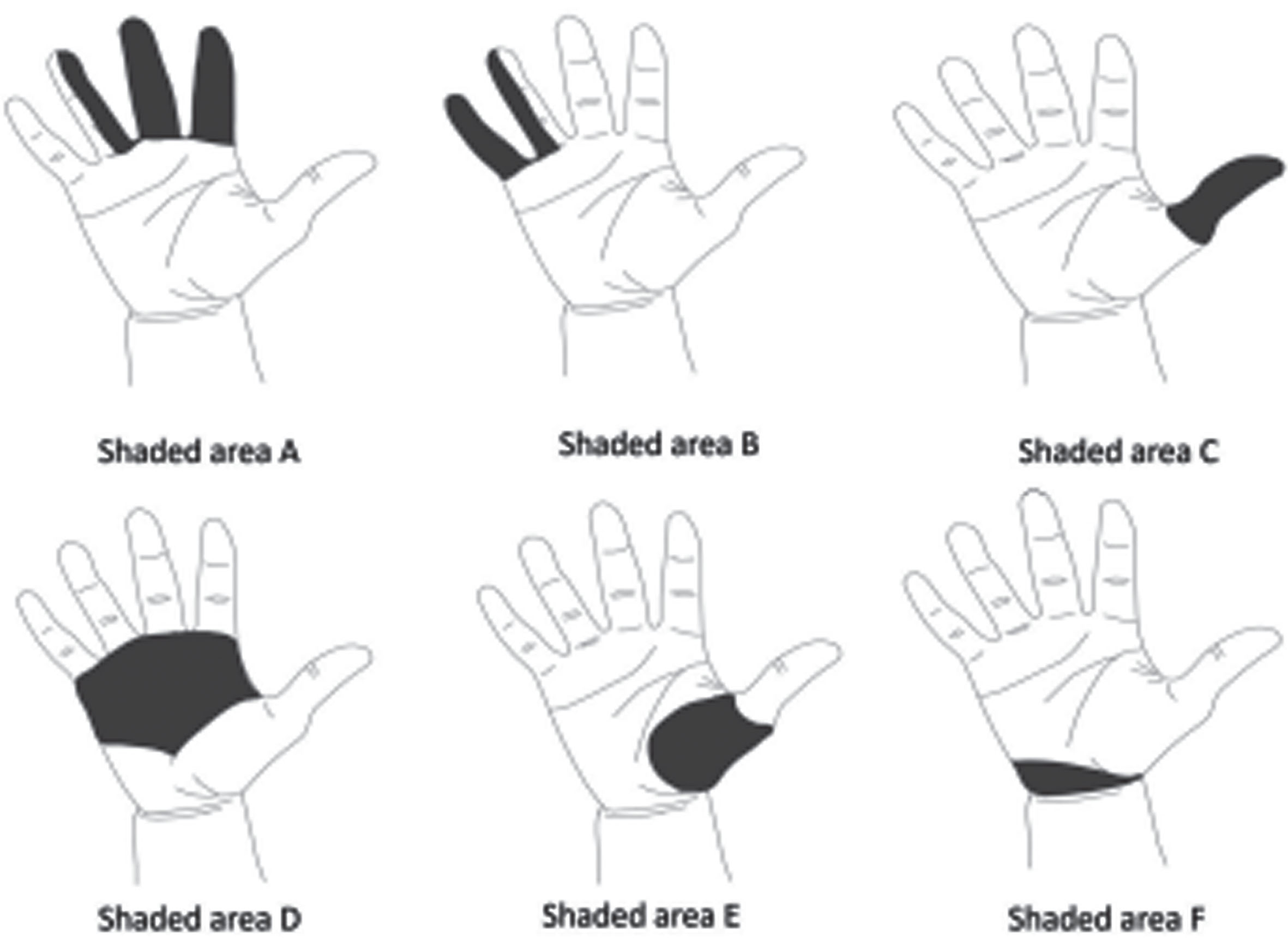
Hand discomfort CHDQ in different areas (Adapted from [22]).
The size of mice length and width and the number of participants in each group
N: the number of participants L: length W: width.
Participants answered the BCQT questionnaire, a scale developed by Levine et al. [17] for CTS. The questionnaire has two main sections. The first section is the “ symptom severity scale,” with 11 items considering Pain, weakness, tingling in the fingers, numbness, and wrist at night and in working condition. The second part is the “ functional status scale,” with eight main questions concerning problems in doing usual daily activities like writing, dressing, holding, gripping, bathing, etc. Each item accepts a score from 1 to 5; a higher score shows more excessive CTS signs [5]. The validity and reliability of the BCTQ are confirmed in the previous studies. There is a good association between the results of BCTQ and median nerve electrodiagnostic tests. It is assessed and is considered the gold standard for evaluating CTS severity [18–20].
Hand discomfort
Discomfort is an unpleasant state of the human body reacting to its physical environment and products like hand tools [21]. We used the Cornell Hand discomfort questionnaire (CHDQ) to score hand discomfort. The survey has high validity and comes from earlier postural discomfort studies. A survey is a screening tool but not a diagnostic instrument.
The CHDQ consists of six items and a hand diagram to show different parts of the hand. That contains questions about the prevalence of discomfort, Pain, and interference with work in different parts of the hand. The general discomfort grade was measured as discomfort×frequency×interference. The highest score is 45. The participants filled in the questionnaire just for the dominant hand. The CHDQ’s validity has been examined, and the results were acceptable [22].
The questionnaires are based on previously published research studies of musculoskeletal discomfort among office workers. Scoring the questionnaires should be self-evident to anyone familiar with this type of research.
System Usability Scale (SUS)
System usability is operatively defined as the subjective perception of interaction with a system [23]. All participants answered a SUS questionnaire. SUS is a fast and reliable tool for measuring usability. It consists of 10 items with five answer choices for respondents, from Strongly Agree to Disagree Strongly. Created by Brooke [24] in 1986, it lets you evaluate various products and services, including mobile devices, hardware, software, websites, and applications. SUS scores are useful for comparison and productive usability testing methods to supply a holistic view of real and perceived user experience [25]. The SUS was explicitly generated so designers and evaluators could have a fast and reliable method to evaluate a product or system’s subjective usability. The SUS data and scores can be analyzed to provide various measures of perceived usability.
Wrist and hand posture assessment
Participants” wrist scores were evaluated by the Workplace Ergonomic Risk Assessment (WERA) tool according to its wrist part assessment. The WERA covers many physical risk factors, including posture, repetition, forcefulness, vibration, contact stress, and task duration. It involved the assessment of the five main body regions (shoulder, wrists, back, neck, and legs). It has a scoring system and activity levels that guide the level of risk and the need for action to conduct more detailed assessments. The WERA has been tested on its psychometric properties, including reliability and validity trials during the development process [26]. In WERA, wrist posture and reputation are categorized into three groups in the wrist assessment part. Figure 3 shows the WERA wrist assessment score.
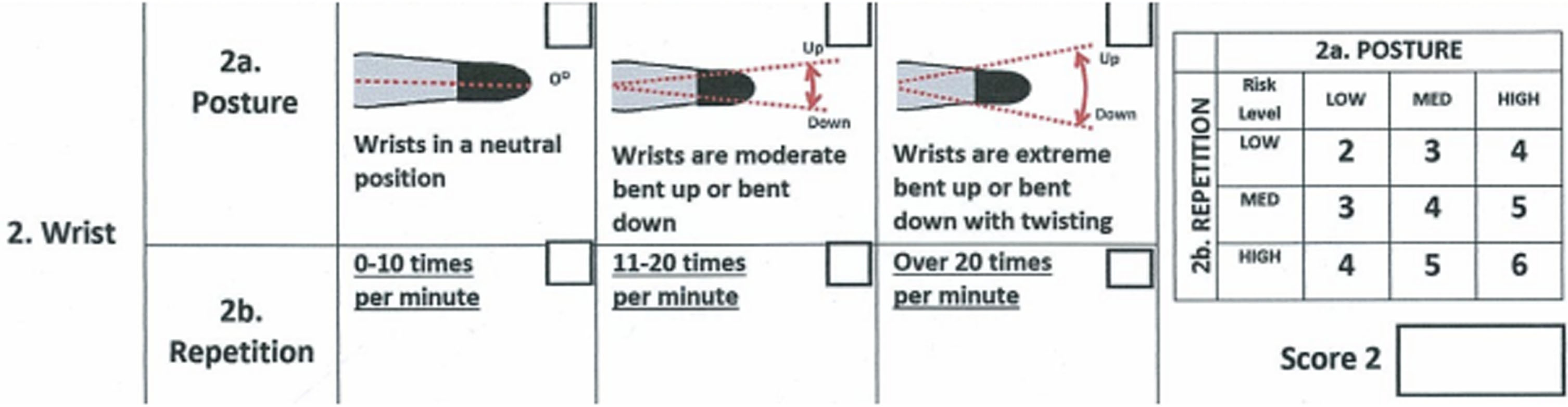
WERA wrist risk assessment score (Adapted from [26]).
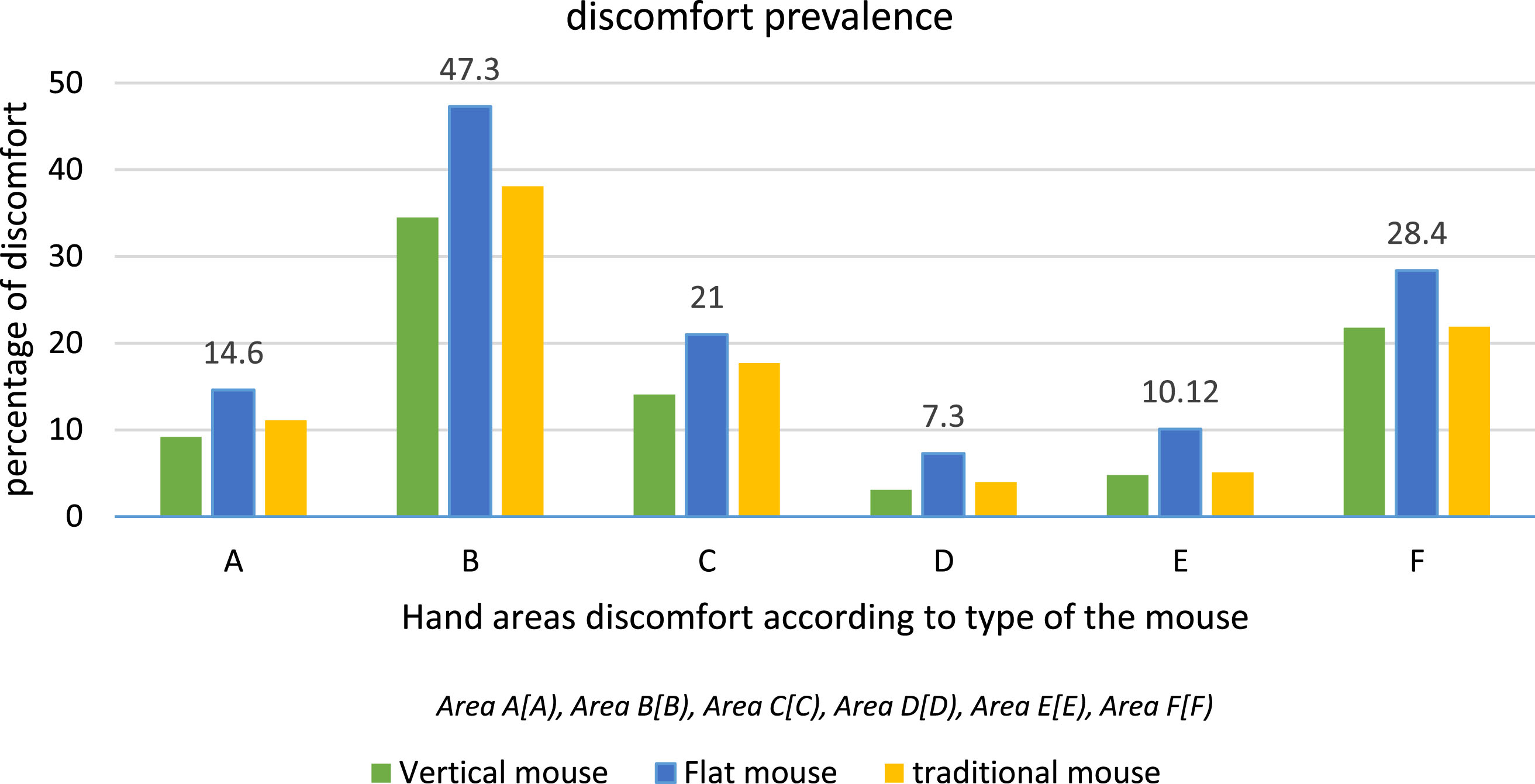
Total percentage of individual’s hand discomfort in different areas.
In addition, hand posture was examined through observation. We gave each participant a special mouse and watched how they typically held their wrist while using it. The hand position that was used most often was considered the dominant one for that participant. The researchers looked at three types of wrist movements: flexion (bending the wrist down), extension (bending the wrist up), and deviation (bending the wrist left or right). A neutral wrist position is when the forearm, wrist, and hand are in a straight line. Ulnar deviation means bending the wrist inward toward the little finger, while radial deviation means bending the wrist outward toward the thumb.
In this experimental study, participants were divided into three groups randomly (group A used the flat mouse, group B used the traditional mouse, and Group C used the vertical mouse). Before any intervention, participants’ hand dimensions were measured by a digital caliper (Mitutoyo 450 mm Digital Caliper). Then, the next day, mice were given to participants according to their hand dimensions. Participants were chosen from three companies and did the same responsibilities, including typing, working with the Office Automation system, and web browsing for an average of 15 hours weekly in each group. The time it takes for carpal tunnel to progress from mild to severe differs from one person to another, so after each month, participants were asked about their hand discomfort and CTS signs; until the 49th day, most participants (approximately 70%) did not have a special problem with mice, but after that, they started to complain. Hence, we continued the study until the third month and stopped it to prevent injuries until all participants agreed to use the mouse. After three months of working with mice, participants answered the hand discomfort Cornell questionnaire and Boston tunnel carpal syndrome severity questionnaire. In addition, the SUS questionnaire was answered by participants to evaluate mice usability. Also, hand posture scores were evaluated by WERA and according to the position (flexion, extension, and deviation).
According to ANSI HFS 100 standard, the test workstation was set up according to the subject’s body dimensions, but participants could adjust their chair and table height for comfort. The Cornell Ergonomic Keyboard and Mouse Platform Systems Evaluation Form assessed mouse quality.
Data analysis
Descriptive statistics were used to calculate the mean value, standard deviation, and frequency of variables. ANOVA in SPSS18 software was used to test the hypotheses.
Results
The ANOVA test was used to investigate the difference among three types of mice regarding their effects on the severity of CTS (Table 2). While there was no significant difference in the severity of CTS when people used different mice (p > 0.05), CTS was more prevalent among people using the flat mouse (mean value = 28.54). The smallest score was for the vertical mouse (mean value = 26.3). There was only a small difference in the rates of CTS severity in the three mouse types. However, CTS severity in all three groups got high scores.
Carpal tunnel syndrome severity among users of three types of mice
Carpal tunnel syndrome severity among users of three types of mice
Table 3 shows the severity of hand discomfort collected through the Cornell hand discomfort questionnaire among mouse users who used different mice. The ANOVA test was implemented and showed a significant difference in area C when different mice were compared according to the hand discomfort they caused (p = 0.014); however, no significant difference was shown in other areas. To be more precise, the descriptive statistics tests were implemented. They showed that the vertical mouse using make put more discomfort in Area B (34.5), the flat mouse put more discomfort in Area F (17.38), and the traditional mouse put more discomfort in Area C (12.14).
The average number of participants with hand discomfort in different areas of their hands
Table 4 shows system usability collected through the SUS questionnaire. The descriptive statistics test showed vertical mice had a higher system usability score (73.5). The difference in system usability rates is remarkable among the three types of mice (p < 0.05); the flat mouse does not satisfy participants as much as the vertical and traditional mice.
System usability score in three groups
Table 5 uses descriptive tests to show the prevalence of different positions that mouse users adopt on their wrists. The highest percentage of hand neutral position was related to vertical mouse users (78.79%). Some vertical mouse users (about 12.12%) tended to adopt the radial deviation position, the most prevalent after the neutral position. In addition, about 85.71% of traditional and 63.88% of flat mouse users tended to adopt the extension position.
Percentage of common wrist postures among users of three types of mice
Table 6 shows the WERA scores in participants according to the mouse that they used by ANOVA. There was no significant difference between different mice in terms of WERA scores. The lowest score is for the vertical mouse (2.75).
WERA wrist average scores among users of three types of mice
According to the study, CTS severity is significant among users of various types of computer mice. It was found to be highest among flat, traditional, and vertical mice users, respectively. However, the difference in CTS severity among these three types of mice was found to be insignificant. Therefore, using any type of mouse can potentially increase the risk of CTS, but there is no significant difference in the risk between these three mouse types. In addition, the hand discomfort difference among the three types of users was significant in hand area C, and system usability was higher in vertical mice. The traditional models were considered an improvement compared to flat mice. Flat mice are the least preferred option among the three models due to their higher scores in tunnel carpal severity, hand discomfort, and lower system usability scores. Most people find using flat mice unpleasant.
Table 2 shows that CTS severity was higher in those who used flat mice (mean value = 28.54). At the same time, it is lower in people who use traditional and vertical mice, respectively, at 27.9 and 25.3. Still, the difference between various mouse types is insignificant in CTS (p > 0.05). Therefore, using the mouse can put more pressure on patients with CTS, but the vertical mouse does not significantly reduce the severity of tunnel carpal syndrome. The pressure level that interferes with normal nerve function is 30 mm Hg, and in previous studies, it is above the medium range when people used mice (ranging from 46.5 to 66.2 mm Hg) [27].
In line with the current study, in previous studies, wrist pads and the vertical mouse was not suggested for patients with CTS over a standard mouse if reduction of carpal tunnel pressure was the main criterion [28]. In another study [29], mouse design is not usually ideal because they set the arms and palm down the forearm so muscles will be stretched, and posture or position is not perfect on the wrist, which will be more at risk of interruption of the wrist nerve (median). The wrists do repetitive movements for a long time for typing and using the mouse. This commonly requires a mixture of force and repetitive fingers and hands activity for a long time. Using hands excessively can lead to a higher likelihood of developing CTS [29]. Therefore, it is advised to opt for a vertical mouse instead of a flat one, as the latter is not as preferable. While this switch may not completely eliminate the risk of CTS, it can serve as a preventive measure.
Hand discomfort was evaluated in six main parts of the mouse user’s hands. Table 3 shows that flat mice participants generally experienced higher hand discomfort. Because, in most areas, the mean values of hand discomfort are higher in flat mouse, traditional mouse, and vertical mouse users, respectively; nevertheless, just in area C, the difference between various mice types is meaningful (p = 0.014). In line with this study, a previous study [8] has shown that task performance and subjective measures got worse when the slopping angle of the mouse increased. The task completion time and satisfaction scores of the 30° slopping and 50° slanted mice were significantly worse than the conventional mouse. Another study [30] showed that Increasing mouse height and angling the mouse top case could rectify wrist posture without negatively affecting performance. Regardless of mouse type, most people felt discomfort more in areas B, C, and F (according to N%). The severity and prevalence of hand discomfort were higher in area B. As a result, using mice for a long time (irrespective of their types) negatively affects hand discomfort, especially in area B, but the effects of mouse type are more visible in area C (p = 0.014). In a previous [31], results showed that eight of the 23 asymptomatic participants used mice (34.8%), and six of the 12 reported hand discomfort (50%). All six participants who met the clinical criteria for CTS showed electrophysiological evidence suggesting right median nerve entrapment neuropathy at the wrist. Specific hand parts with a high prevalence of discomfort are the wrist, ring, middle, index fingers, and thenar region while using computers, according to a previous study [32]. Therefore, many computer mouse device users are at high risk of developing median nerve entrapment neuropathy at the wrist.
System usability difference was significant among the three mouse users (p = 0.017). Those who used the flat mouse for a long time were more unsatisfied (mean = 65.5) because of the high pressure and pain that they felt, and the people with the vertical mice (mean = 73.5) and traditional mice (mean = 72.5) were more satisfied. In a previous study, most participants claimed that the slopping mouse needed excessive wrist deviation during activity. Additionally, some participants emphasized that wrist deviation in the neutral forearm position was more demanding than in the pronated forearm position (90°) [8]. These factors led to dissatisfaction among users.
According to Table 5, most participants who used a vertical mouse had a neutral wrist position (78.79%). In contrast, wrist position decreased for traditional and flat mouse users, and most did not have a neutral position when using a mouse. A small percentage of traditional, vertical, and flat mouse users tended to adopt the flexion position in their wrists. However, extension, radial deviation, and ulnar deviation were more prevalent among all users. Over 85% of people who used traditional mice and over 63% who used flat mice tended to adopt the extension position in their wrists, a risk factor for musculoskeletal injuries such as CTS [33]. However, traditional mouse users reported feeling lower discomfort and CTS severity, possibly because of the hand rest that traditional mice provide. In contrast, flat mouse users had to bend their fingers, which may be why discomfort and disorders have different rates in different mouse users. Many of the participants adopted an abduction position when using the mouse. According to Table 6, the average wrist score was higher in traditional mouse users, but there was no significant difference between the three mouse types in terms of wrist scores (p > 0.05). Results showed that, while using a mouse (irrespective of its model) can increase the CTS severity, mouse models and wrist posture are significantly associated with hand discomfort. However, it does not considerably affect CTS severity because users did not use the mouse excessively. However, if users’ WERA was higher, they probably tended to show a higher CTS severity.
Determining the effects of different mouse types is extremely important because computer work is prevalent in the new world. Using an appropriate mouse can reduce the harmful impacts of using mice; all kinds of products should provide comfort for their users. Hence, the study was performed to compare the effects of different mice types on hand variables. It can be used in offices and homes to choose a better product.
The study had several limitations that made the findings less definitive. First, many employees declined to participate, so it was hard to properly assess the variables of interest. Second, the researchers could not use tools like electromyography to objectively measure muscle fatigue. Third, participants were already used to their existing mice, so getting used to the new mice took time. The study also did not account for the influence of personal characteristics. The 3-month study period may have been too short to understand the long-term impacts of different mouse types. The sample size was small due to the limited number of employees and those with musculoskeletal disorders. Other factors like keyboard use and work duration that could also affect hand variables were not considered. Future studies need to consider these factors to gain a comprehensive understanding of how different mice affect variables like discomfort.
Conclusion
While mouse type was linked to thumb discomfort, and discomfort was common regardless of mouse type, the study has significant limitations. CTS severity increased with mouse use, but mouse type had no significant effect. Vertical and traditional mice had better usability. Wrist posture was not critical to CTS severity, though vertical mice promoted neutral wrist posture. More objective research using tools like electromyography is needed to assess muscle activity and fatigue from mouse use. Finger posture, pressure, and fatigue should also be analyzed. Further research with larger samples, longer duration, and more factors considered is necessary to draw strong conclusions.
Informed consent
Written informed consent was obtained from all individual participants included in the study.
Footnotes
Acknowledgment
The authors would like to thank all participants who were involved in this study.
Conflict of interest
The authors declare that they have no conflict of interest.
Funding
None to report.