




Abstract


Another important and largely untapped venue for communication training is the clinical setting, as numerous meaningful learning opportunities occur every time someone delivers serious news to patients and their family members. These are not predetermined standardized situations. Rather, the richness, variety, and realism of these interactions can address some of the main issues in communication skills training programs. The challenge is to provide the same individualized reflective feedback on the process and outcome of the communication encounter as the multiday course. The Vital Talk iPhone app, created by arguably the world's best communicator of serious news, Dr. Anthony Back from the University of Washington, goes a long way toward addressing this challenge.
The Vital Talk iPhone app acts in some ways as an expert facilitator to help learners self-correct and improve their communication skills. The app does this by combining short didactic videos and written summaries with skills practice and feedback done with real patients. Communication training in the clinical setting enables app users to try multiple approaches to the delivery of serious news and to observe multiple patient reactions to these approaches.
The Vital Talk iPhone app has two main curricular components. The first component is designed around helping users learn the five-step GUIDE framework for giving serious news. Each of the five steps in GUIDE (Get ready, Understand, Inform, Deepen, and Equip) is introduced by Dr. Back through short half-minute clips under a Know the Basics tab within the app (see Figure 1). Users can also watch short clips in each step under a Watch an Expert tab where experts demonstrate the skills, helping users refine their delivery styles. Important teaching points are summarized in each section to help the app user in preparing to practice each skill.
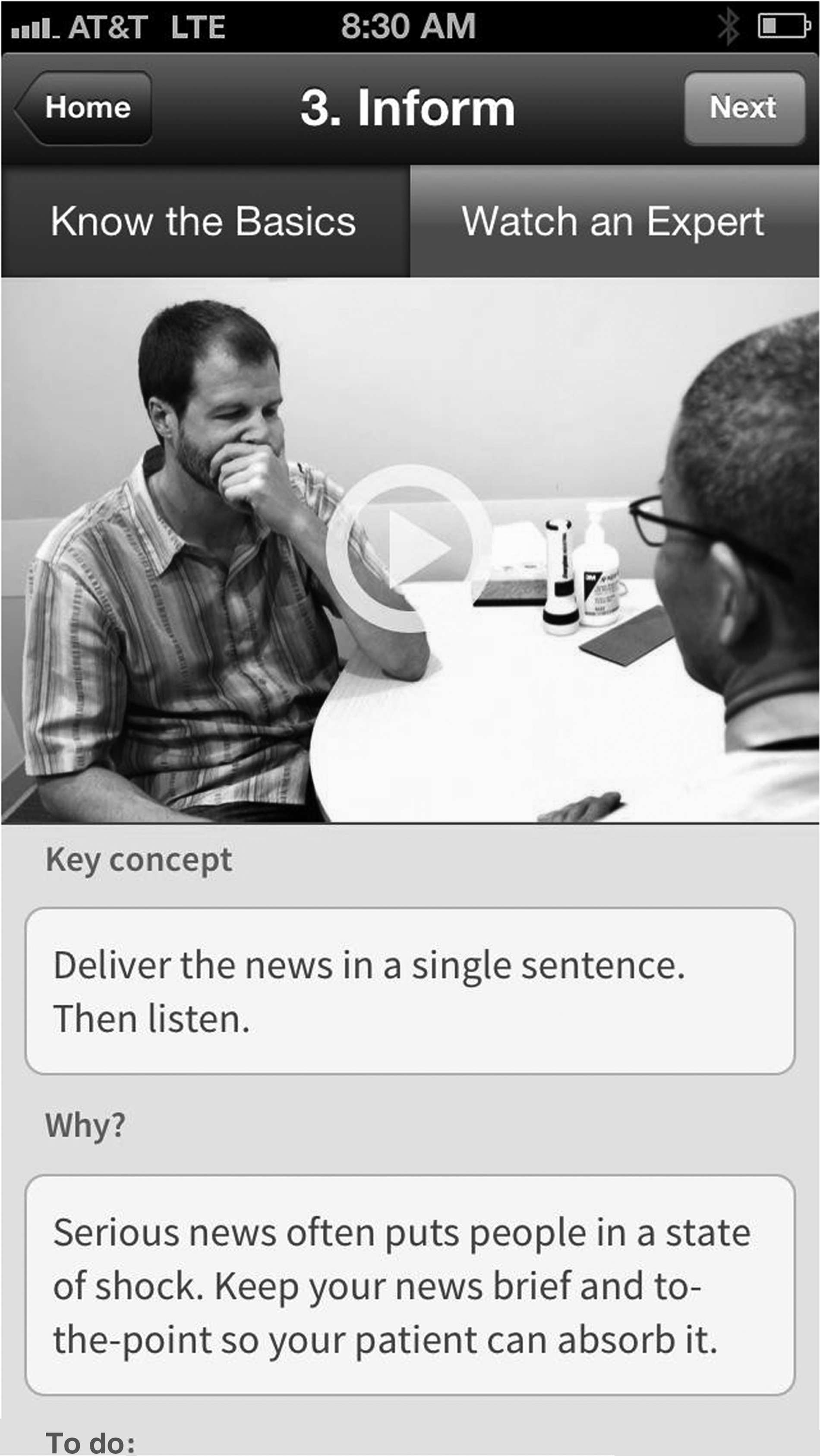
Screenshot of the Vital Talk Inform step.
The second curricular component of the app is focused on the task of delivering serious news in a real-life clinical setting. This skills practice section is divided into two parts. Prior to delivering serious news, the app user must first commit to working on one of the five steps or on a specific communication skill. The app directs users to pick one observable behavior that would indicate that they have demonstrated the skill they were working on. The user then can review the five steps of GUIDE by clicking on the back button to go to the main screen.
After the user is finished delivering the serious news, the app directs the user to debrief. The app, acting like a facilitator in a small group, asks users to rate themselves on the skill they had committed to working on prior to the interview, and it asks several open-ended questions, such as “What went well?” and “What do you want to improve upon next time?” The app allows users to review past debriefings to see what improvement has occurred over time.
As with any new app, there are areas for improvement. First, while the reflective feedback portion is a great way for users to set their own goals, the responses are limited in some of the sections. For instance, the list of success statements that users can choose to show that they have practiced successfully is somewhat narrow, with no mechanism to type in your own response. For instance, there are no responses listed in the app to show that one demonstrated skills listed in the “Get ready” step of GUIDE Similar issues arise when the app asks the user “What could have gone better?” during debriefing after an interview.
A more ambitious yet important future development of this app revolves around taking advantage of the full power of the mobile device. Physicians' ability to accurately self-assess is questionable, with one systematic review revealing either weak or no association between physicians' self-rated assessments and external assessments. 2 Those who perform the least well by external assessment seem to be the ones who overestimate their abilities using self-assessment. Providing guided feedback from experts, as Vital Talk does to some extent, helps. However, having some external source on which to base an accurate appraisal of performance would be a great addition. One can easily imagine ways of including external sources of observation and feedback using the Vital Talk platform. For instance, imagine that after the serious conversation, the app directed you to a feedback page that could be filled by a patient, family member, or other health care provider who attended the meeting. Also, physician-patient encounters could be recorded via the app, allowing the discussion to be reviewed at a later time by the app user or expert facilitators. This type of feedback, while more complex from both a technical and patient privacy perspective, is feasible, as demonstrated by a recent publication by Tulsky and colleagues. 3
With a couple of minor tweaks, the Vital Talk app would also be a great resource for the many of us who teach delivering serious news in a clinical setting. There is a paucity of apps that focus on giving feedback to learners. As a feedback tool it would be fabulous if this app would guide me in giving feedback to learners. This would include walking through the same steps but would be focused on giving feedback to someone else. Integrating the feedback with the most commonly used evaluation collection tools, such as E*Value, would further increase the potential, and would be more than welcomed by any residency or fellowship program director.
Overall, Vital Talk is a great resource for the medical student, resident, or practicing physician interested in improving their communication skills. World famous communicator Dr. Back boils down his teaching into bullet points and brief videos that can easily be incorporated into clinical workflow, even for the busy clinician. If one had to choose a CME activity to improve communication without going to a multiday course, this app is it.