



Abstract
Recognizing that music teachers may struggle to implement songwriting activities in a classroom, and that iconic notation provides an opportunity to increase access to school music for all students, the purpose of this article is to share one model of songwriting activities in a music technology class using chord diagrams, beat grids, and keyboard charts. The article outlines specific steps to the creation of drum grooves, simple chord progressions, bass lines, and melodies, using forms of notation that are appropriate for popular music instruments and styles.
NAfME is glad to offer one hour of professional development recognition to you for reading this article. Please follow the link below and complete a short quiz to receive your certificate of completion.
Photo Courtesy of the Author.

The field of music education has well-established pedagogies for learning to play instruments and sing through sequential method books and a canon of school music repertoire. There are countless resources to help students understand five-line staff notation and leverage its ability to communicate and re-create music. Approaches to teaching songwriting activities, however, may elude music educators who do not regularly engage in this form of creative work. Fortunately, many popular music songwriters approach their craft with protocols and procedures that may easily be reproduced in a classroom setting using iconic notation.
There are existing models of songwriting activities in K–12 music technology and general music classroom spaces, as well as scholars who have outlined procedures that demystify the songwriting process. Alex Ruthmann, a professor of music education and director of New York University’s Music Experience Design Lab, drew inspiration from “writers’ workshops” commonplace in language arts classes to create songwriting routines for his middle school general music students. 1 He described how teachers facilitate writers’ workshops through “minilessons, share lessons, and conferring sessions tailored to meet the needs that emerge as the writers progress in their work” (italics in original). 2 Writers’ workshops are not prescriptive; they are designed to meet the goals of individual learners through relevant assignments and projects. Ruthmann structured songwriting and composition activities in “composers’ workshops” to include collaborative experiences as a class; mini-lessons taught by the teacher that focused on introductions, repetition, balance, endings, and transitions; sharing through student presentations; online galleries that featured published songs; and celebration sessions that promoted students’ best work. 3 Music education researcher John Kratus also shared procedures for teaching songwriting classes at the high school level, noting that these courses may “reconnect students’ out-of-school musical experience to in-school music instruction.” 4 Kratus recommended having minimal prerequisites to increase access to school music and to divide the class time into three categories that seem to align well with Ruthmann’s composers’ workshops: “teacher-led directed discussion and guided listening, students’ solo and collaborative songwriting, and song sharing.” 5
Songwriting activities can be a powerful experience in music technology classes. Music education scholar Evan Tobias described a high school songwriting and technology class that viewed students as “‘hyphenated musicians’ by thinking and acting as songwriters, performers, sound engineers, recordists, mix engineers, and producers in ways that were recursive and often overlapping.” 6 Tobias recommended that classrooms be a cross between a computer lab and an open classroom to maximize the potential of the creative process. And just as Kratus recognized the ability of songwriting classes to engage more students in a school music program, Tobias argued that these classes serve more students by providing alternatives to traditional large ensembles. Other scholars have outlined specific procedures for songwriting projects, such as using film scores and creating original pop albums in music technology classrooms. 7
Songwriting activities do not necessarily require prerequisite knowledge of five-line staff notation and music theory. Despite being the only musician to be inducted into the Rock and Roll Hall of Fame three times, songwriter/guitarist Eric Clapton could not read five-line staff notation. 8 In his autobiography, Clapton described the anxiety he felt during a session with Aretha Franklin, writing, “I felt so nervous because I couldn’t read music, and they were all playing from music sheets on stands.” 9 In an interview with the television program 60 Minutes, songwriter Paul McCartney admitted that none of the Beatles could read music, stating, “I don’t see music as dots on a page. It’s something in my head that goes on. . . . None of us did in the Beatles. We did some good stuff though. But none of it was written down by us.” 10 If some of the greatest songwriters in the history of popular music did not read traditional staff notation, then why should it be a prerequisite for students in our school music programs? Songwriting activities that require an advanced understanding of music theory and five-line notation will only serve to marginalize students less interested in the Western classical music tradition (e.g., band, orchestra, and choir) and may limit the creativity of students who imagine musical ideas beyond what they can notate on a staff.
Of course, some form of notation would be helpful when teaching songwriting, because it provides a means to communicate, share, and document musical ideas. Iconic notation systems have existed for centuries to serve the purpose of recording and sharing music in written form. Methods for elementary general music often include iconic notation systems to introduce music reading for younger students. For example, elementary school students might associate pictures of a single plum and a pair of cherries with a quarter note (plum) and pair of eighth notes (cherries). Students could chant simple quadruple rhythm patterns such as “plum, plum, cherries, plum” when prompted by a visual of the fruit arranged in this manner. Eventually, the plum and pair of cherries would be replaced with a quarter note and pair of eighth notes, connecting sound to symbol. Scholars advocate that students should begin to read five-line staff notation only after they are able to assimilate musical sounds with iconic notation. 11 Forms of iconic notation may be found in contemporary classical music settings as well, such as the music of Steve Reich. Figure 1 demonstrates how Reich’s “Music for Pieces of Wood” could be expressed through iconic notation, with color-coded blocks that represent rhythm and instrumentation. Please note that this is not the original notation that Reich used for this composition, but an interpretation of the piece using colored rectangles.
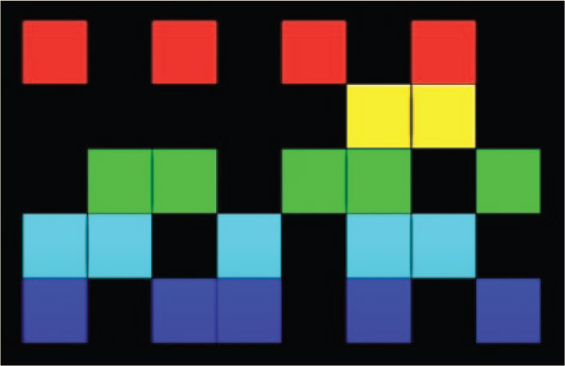
Steve Reich’s “Music for Pieces of Wood.” Source: https://www.youtube.com/watch?v=gy2kyRrXm2g
The National Coalition for Core Arts Standards defined iconic notation as the “representation of sound and its treatment using lines, drawings, pictures,” 12 and it is embedded in the new Core Arts Standards framework for K–12 school music education in the United States. Therefore, a teacher who uses iconic notation in the classroom is teaching in accordance with current standards for music education. Forms of iconic notation have historically provided songwriters with a means to express musical ideas through chord diagrams, chord symbols, piano roll, beat grids, and tablature. Iconic notation is often more intuitive than a Western five-line staff and makes familiar songs more accessible to students.
Recognizing that chord diagrams, beat grids, and other pictures of musical ideas provide an opportunity to increase access to school music for all students, the purpose of this article is to share one model of songwriting activities in a music technology classroom using iconic notation. The article outlines specific steps to the creation of drum grooves, chord progressions, bass lines, lyrics, and melodies, using forms of notation that are appropriate for popular music instruments and styles. After examining each unit of the songwriting process, the article concludes with considerations for how these activities may complement existing school music ensembles and classes.
Building Blocks
Cognitive psychologists have demonstrated that students learn best when complex tasks (such as writing a song) are broken down into smaller chunks. 13 Therefore, this section presents activities that produce building blocks to be assembled into a larger structure of a complete work. There is no standard approach to songwriting, so these building blocks could be created in any order and should be revised at multiple stages of the project. The tools and instruments used to create these building blocks may vary based on the resources and equipment available to the classroom. For simplicity, examples of each activity are described using basic components of a music technology classroom: a MIDI keyboard controller and digital audio workstation or DAW (e.g., Soundtrap, GarageBand, Mixcraft). The MIDI keyboard could easily be replaced by virtual instruments on a mobile device or by real instruments (e.g., ukuleles, guitars, electric basses, drum kits), depending on what tools are available to the class.
Drum Grooves
Before creating a drumbeat for an original song, students should learn how to perform and record a variety of grooves using their body, an acoustic instrument, a virtual instrument, a MIDI keyboard, or a drum pad controller. Figure 2 shows the iconic notation for a rock groove, using the corresponding keys on a MIDI controller for the kick, snare, and hi-hat. It is important for students to identify the correct keys on the controller, especially if they have no prior keyboard experience. The Little Kids Rock nonprofit organization uses a visual representation of a pair of chopsticks and a fork to help students identify groups of two (chopsticks) or three (fork) black keys on a keyboard, as well as the corresponding pitches that precede those groups, C and F. 14 Students should first identify the white key to the left of a group of chopsticks (two black keys) that sounds like a kick drum. This is C1 on the keyboard, which may be the bottom C or near-bottom C of a MIDI controller, depending on the size and settings of the device. After students have re-created a variety of drum set grooves using the controller and a digital audio workshop (DAW), they should create their own drum set groove using iconic notation (Figure 2).
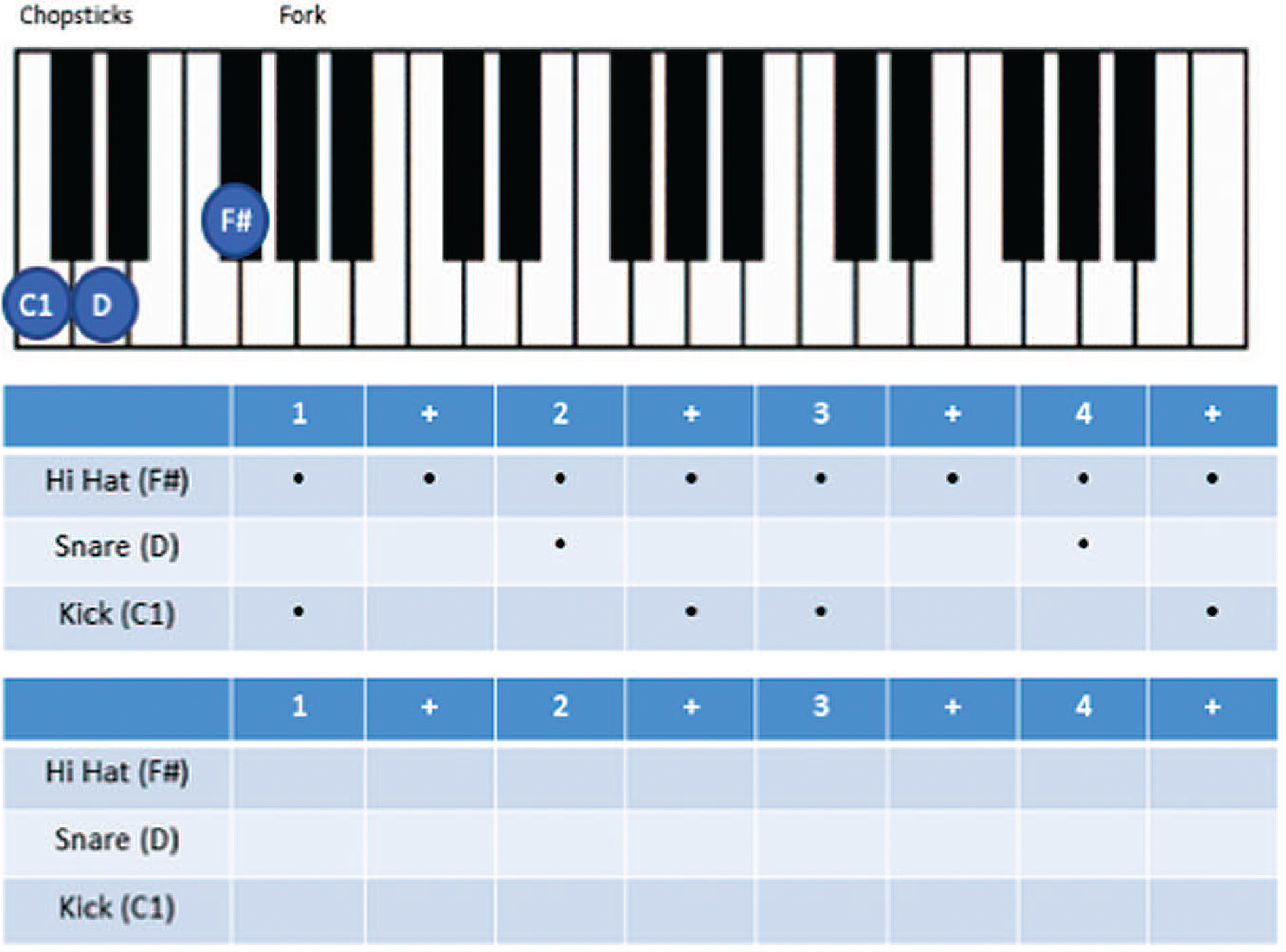
Performing and creating drum grooves using iconic notation
In many cases, it would be more appropriate for a student to use an electronic drum sequencer rather than programming acoustic drum set sounds on a MIDI controller. Sequencers may be the most appropriate tool for rap, hip hop, and electronic dance music (EDM) styles, while acoustic drum kits (or acoustic drum kit sounds) are more commonly used in rock, country, and pop music. Many computer-based and mobile DAWs include a beat sequencer as part of the software package with the same general look and feel as an expensive hardware drum sequencer. Online sequencers are a great option for classrooms that don’t have access to a software DAW, and they are often free and accessible outside of school. Splice.com, drumbit.app, and beatlab.com are online sequencers that use iconic notation and beat grids for a variety of percussion instruments (Figure 3). In most cases, students simply click on a tile to trigger a sound on/off on the macrobeat, microbeat, or subdivision of the microbeat to create a rhythmic pattern. These services are free for basic use, and paid subscriptions are available for more complex projects.
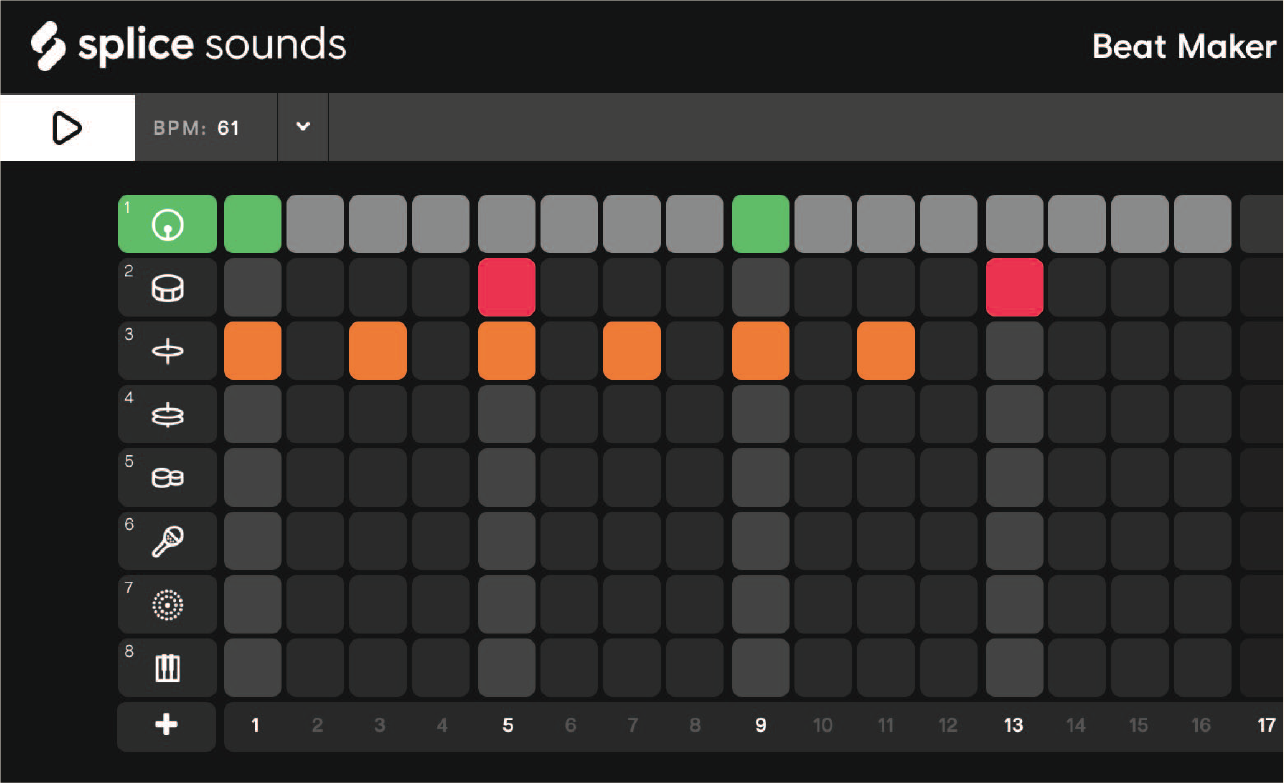
Online beat sequencer using iconic notation. Source: Reproduced with permission from Splice Sounds, http://splice.com
Pedagogical Considerations
Because drum grooves primarily focus on one musical element, rhythm, the construction of drum parts may be an appropriate first step in the songwriting process for many students. Since it may be difficult for student songwriters to record multiple parts at once (e.g., kick, snare, hi-hat) when creating their song, they could concentrate first on the kick drum part, gradually adding the other instruments of the kit over time on additional tracks. Once they are satisfied with the result, students could combine multiple tracks into a single drum kit part for easier editing. It may be useful to invite students to perform their drum part using body percussion or classroom instruments. This approach solidifies the rhythm in the songwriter’s ear and helps them understand the implications of performing the part live.
When recording their drum kit part using MIDI instruments, students will be able to see their performance mapped onto a grid. This is a great way to measure rhythmic accuracy and provides useful feedback to the student about their own performance. In most cases, students should eventually quantize their drum parts, a process by which the DAW places each note onto a metric grid using a note duration defined by the user. For example, the songwriter might quantize their drum kit part to the eighth note, meaning every attack would line up perfectly with a macro- or microbeat. Most popular music songs are quantized to ensure every part is perfectly aligned with the meter of the song.
Chord Progressions
Students may begin to develop chord progressions using iconic notation before or after they have established a drum groove. There are several online resources to help students understand the relationships among chords in popular music genres. Hooktheory.com contains analyses of thousands of songs, notated in color-coded iconic notation and piano roll format (Figure 4). Hook theory.com also has tools for students to build their own chord progressions, although recordings of these songs may not be easily integrated into a DAW. Students should keep in mind that songwriters typically use familiar chord progressions and formulae when writing new music; there is no need to reinvent the wheel when it comes to developing chord progressions for a song.
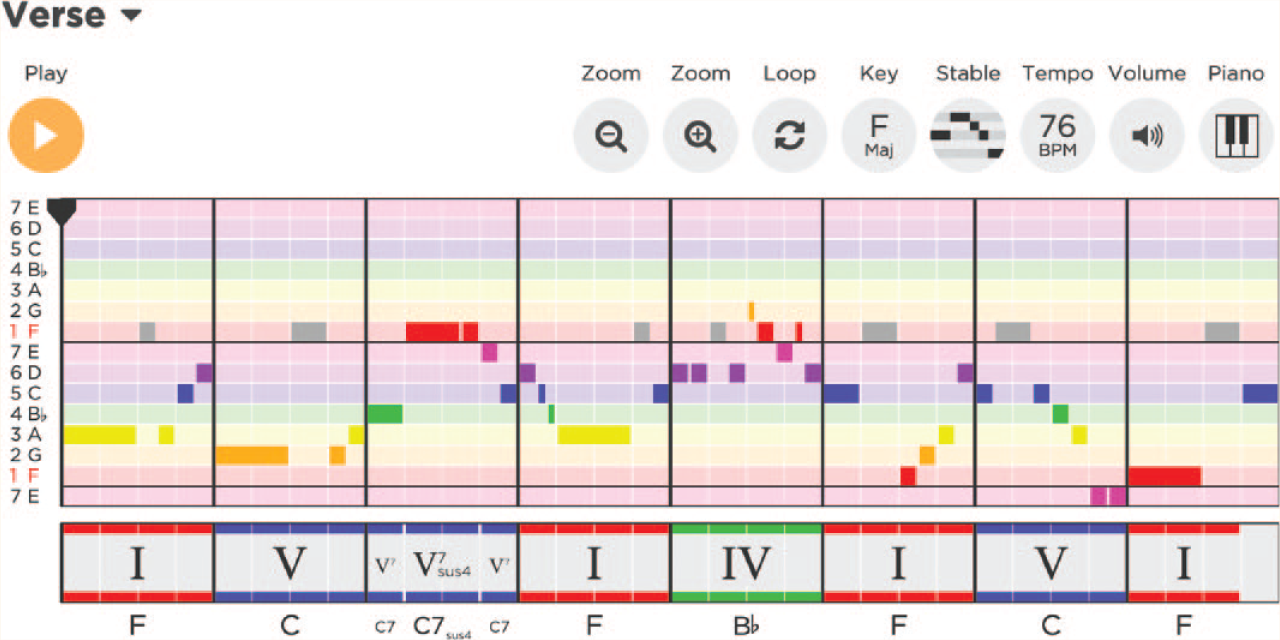
Analysis of “Hey Jude” by the Beatles. Source: Reproduced with permission from Hooktheory, http://hooktheory.com
Jamstudio.com is another tool for creating chord progressions performed by guitar, drums, bass, and keyboard in rock, techno, and country styles. Jamstudio.com allows users to drag and drop chord symbols onto a lead sheet and solo, mute, or mix the instruments that perform the progression. This tool may be particularly useful for students who cannot yet play these chords on a harmonizing instrument, such as ukulele, guitar, or keyboard. This website uses a lead-sheet style of notation that allows students to hear the relationships of chords without needing to know how they are expressed on a traditional five-line staff (see Figure 5).
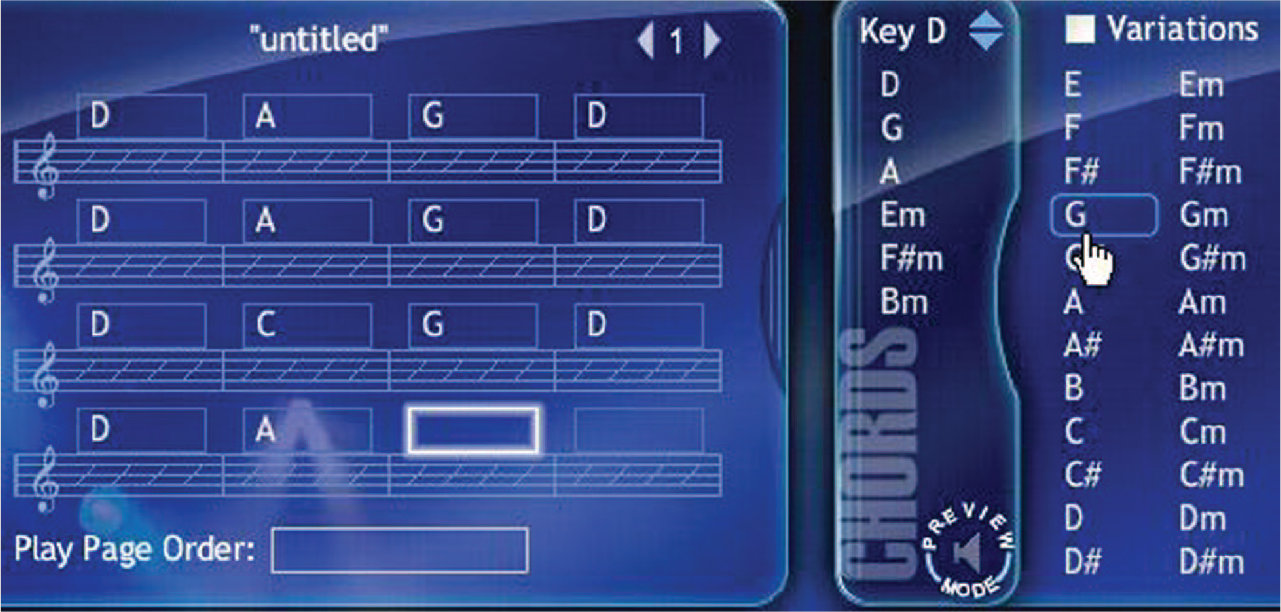
Building a chord progression. Source: Reproduced with permission from JamStudio, http://jamstudio.com
The virtual instruments in GarageBand iOS allow users to perform chord progressions on keyboard, guitar, and other instruments with no prerequisite knowledge of music theory or standard five-line staff notation. Still, it may be useful for students to understand how chords function in a variety of key centers. A chord progression chart (Figure 6) may help students visualize the relationship among chords in any given key.
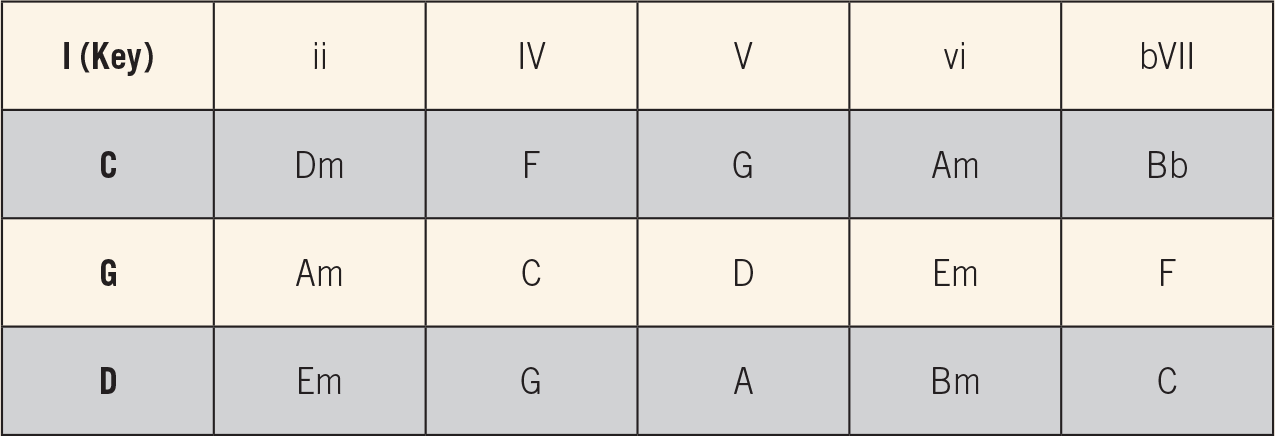
Chords commonly used when writing Western popular music in a major key
Just as students learned drum groove language by re-creating a variety of styles with a virtual instrument or MIDI controller, it is important for students to re-create a variety of popular chord progressions, especially since there are common formulae used for hundreds of songs. One of the best ways to experience these chord progressions and become familiar with them is to perform them on real instruments. Iconic notation in the form of chord diagrams for ukulele and guitar (such as Figure 7), or keyboard diagrams developed by Little Kids Rock 15 (Figure 8), will make chordal instruments much more accessible to novice players and will help songwriters better understand the nuances of the instruments in their composition. Notice that Figures 7 and 8 use the “mi” nomenclature to represent minor chord symbols, which is consistent with the Little Kids Rock materials.
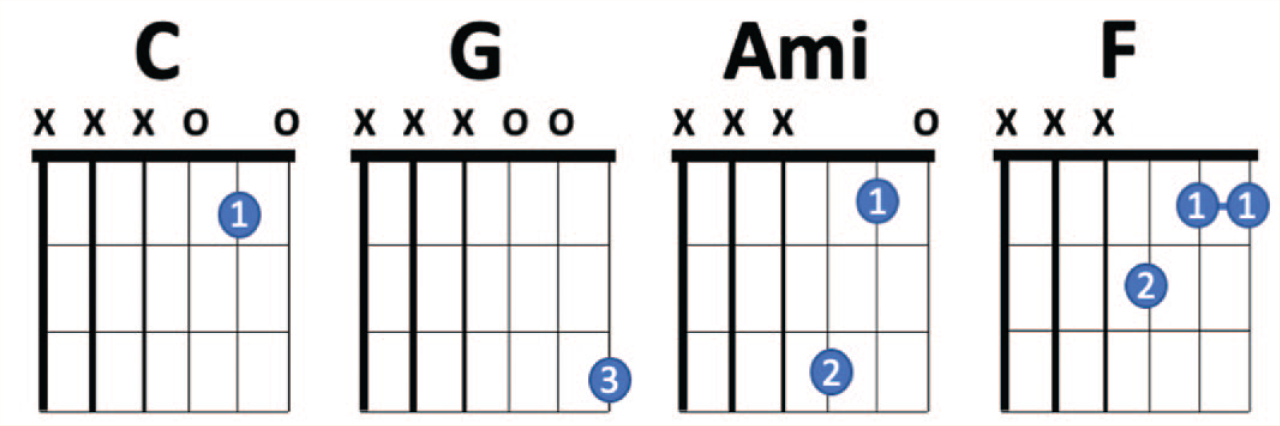
Iconic notation for easy three-string guitar chords

Iconic notation for keyboard. Source: Reproduced with permission from Little Kids Rock, http://littlekidsrock.org
In the United Kingdom, the nonprofit organization Musical Futures International developed a tool called Jam Cards that allows students to quickly identify which keys on a keyboard (including a MIDI controller) are performed to create chord progressions in any key. 16 Using this iconic notation tool (Figure 9), students can easily transpose their song into a key that allows the vocals to be in a more comfortable range, or students can experiment with a variety of keys before settling on one that is the best fit.
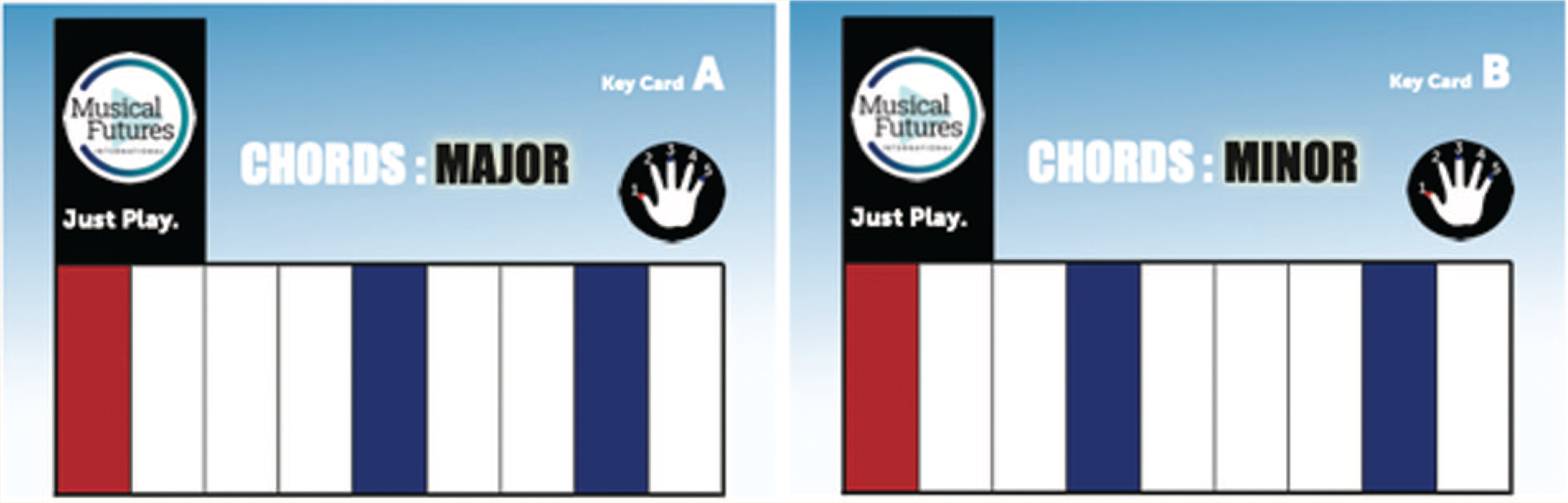
Key Card tools for learning major and minor chord shapes. Source: Reproduced with permission from Musical Futures International, http://www.musicalfuturesinternational.org/key-cards.html
Once students have outlined chord progressions for at least a few sections of a song (e.g., intro, verse, chorus), they will need to record them using a DAW. Some of the online chord progression tools may be recorded into the DAW, but recording the song directly into a DAW will allow for more editing flexibility later in the project. Chord progressions performed by virtual instruments in GarageBand iOS may be recorded directly into a project, or artists can use a MIDI controller with GarageBand for MacOS (or a comparable DAW). Of course, students can also record real chordal instruments (e.g., ukulele, guitar, keyboard) directly into a DAW with an audio interface, using a microphone when necessary for acoustic instruments.
Pedagogical Considerations
However your student songwriters develop their chord progressions, whether through websites, virtual instruments, or real instruments, they should be mindful of the power of simplicity in popular music chord progressions. Through guided listening activities focusing on harmonic progressions and song forms, students may understand how common chord progressions are repeatedly used to generate new songs. Invite students to chart the sections of their favorite songs, including the intro, verse, chorus, bridge, or other material. They may be surprised by the limited number of chords and repetitive nature of the harmonic progression. A quick online search yields countless examples of three-chord, two-chord, and even one-chord songs. Encourage students to limit the chords in their first original songs, and not to assume challenging chord progressions are better than simple ones.
Bass Lines
After students have established a chord progression and drum groove, they should begin to construct bass lines that fit their songs. The bass is often heard together with the kick drum, so students might begin by looking at the kick pattern in their drumbeat grid to determine how root notes from the chord progression could align with that rhythm. Since popular music bass lines are rhythmically repetitive, it would not be necessary to notate the bass part for each measure of the song. Figure 10 presents iconic notation for a bass line that corresponds to the kick pattern of the drumbeat excerpt in Figure 2.

Iconic notation for a bass line rhythm
The bass line rhythm could be combined with images of the fretboard when writing for a real instrument (Figure 11), or pictures of the keyboard (like the example in Figure 8) if working with a MIDI controller.
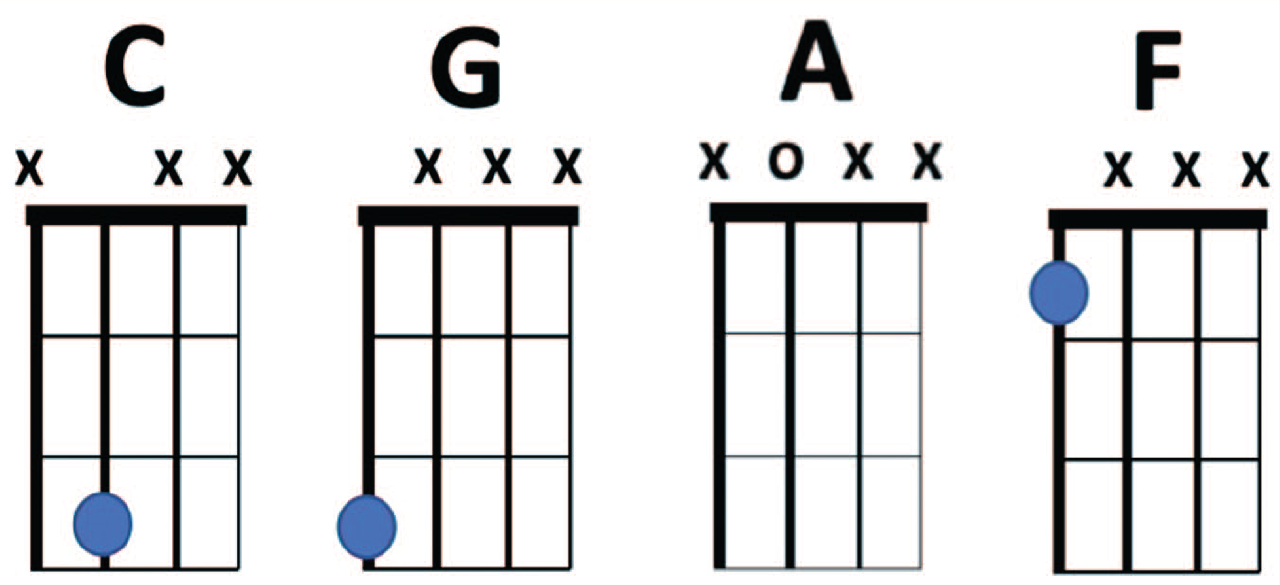
Iconic notation for chord progression on the bass
Pedagogical Considerations
Since the strings on the electric bass are the same as the four lowest strings of the guitar (transposed down one octave), students can learn to play their bass lines on guitars if these instruments are readily accessible. Students may be more likely to write simple bass lines if they understand how they are played on a physical instrument. Playing bass lines on a “real” instrument will also lead to new understandings about the nuances of the bass and how commonly used intervals (e.g., fourths, fifths, octaves) map onto a fretboard. This process may yield more original bass lines that are also easier to perform.
Lyrics and Melodies
Eventually, students will develop a general concept for their songs that informs the construction of the instrumental tracks. A common approach to writing lyrics is to brainstorm a list of words that are related to that topic, identifying potential rhyme pairs. 17 Then, students could organize these pairs into a rhyme scheme, developing lines that end with the targeted rhyme. It will be helpful to have a backing track of drums, bass, and chordal instruments playing in the background while students brainstorm and write lyrics to ensure the rhythm and tempo of the lyrics match the style and feel of the instrumental parts. Students can practice this lyric-writing process with speed drills that challenge the writer to develop rhyme pairs corresponding to a cartoon, an important photo found on their phone, or some other visual likely to generate musical ideas. I have found caption-less cartoons from The New Yorker magazine work well for these warm-up activities. I have also used a variety of lyric-writing exercises from Boston’s Berklee College of Music’s online songwriting classes, which are shared for free at https://www.berkleeshares.com.
Once students have settled on the rhythm for their lyrics, they should consider developing a melody to accompany the text. Of course, some popular music styles do not require a melody for the verse and/or chorus, and students—particularly those interested in writing in the style of rap and hip-hop—should not be required to write a vocal melody if it does not work with their song. If students do wish to write a melody, they can use keyboards, virtual instruments, and iconic notation to help them identify pitches that work with their chord progression. If the chord progression is diatonic, it may be useful to limit note choices to a major, minor, or pentatonic scale. Many virtual instruments on mobile devices include options to limit note choices to specific scales (Figure 12).
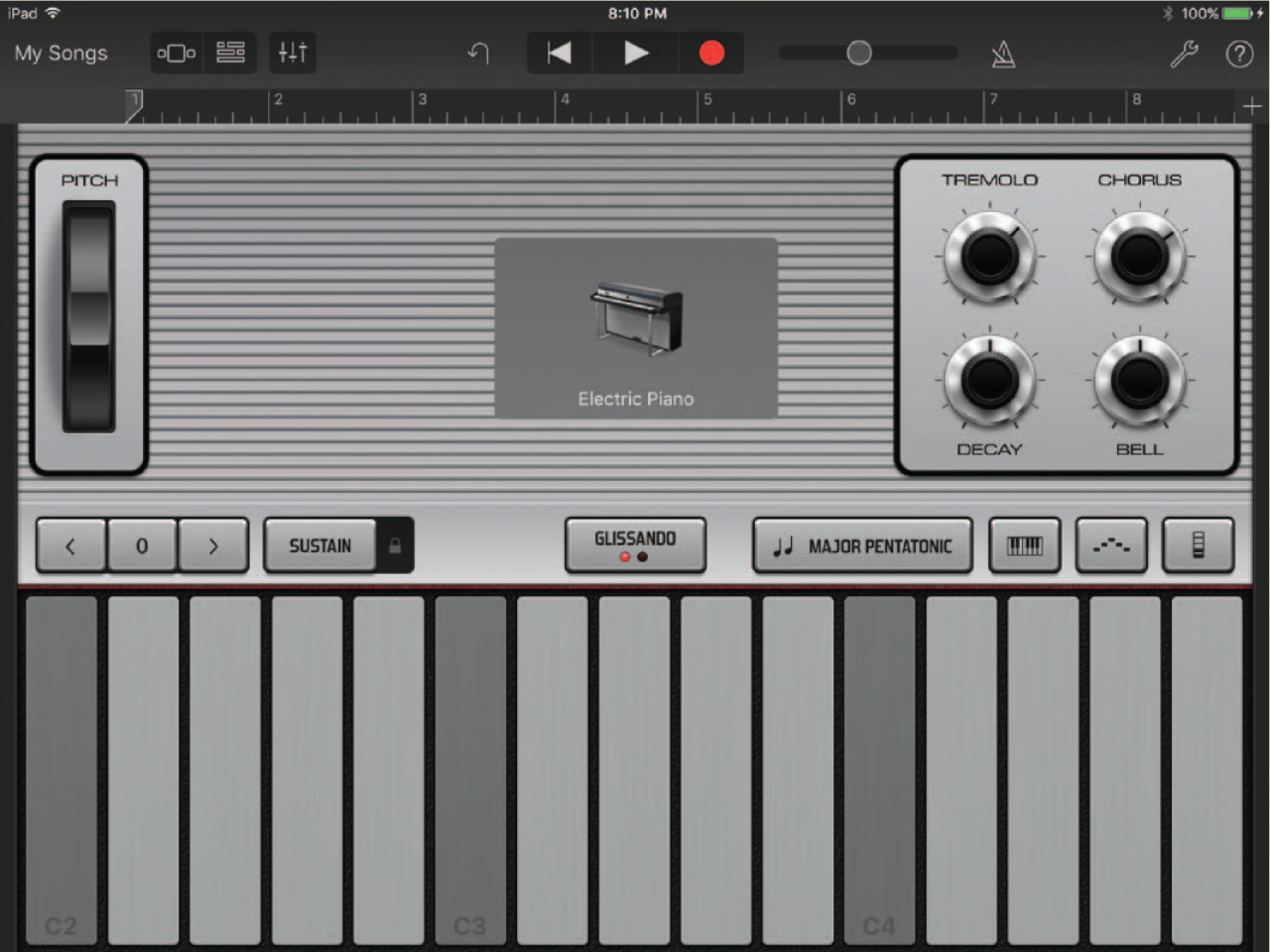
A virtual instrument that is limited to the C-major scale in GarageBand for iOS. Source: Reproduced with permission from Apple Inc. GarageBand is a registered trademark of Apple Inc
In addition to GarageBand for iOS, there are several free web tools for creating melodies using iconic notation, including Chrome Music Lab Song Maker and OnlineSequencer.net. The Chrome Music Lab Song Maker uses a piano roll iconic notation that shows students the relationship of pitches in a diatonic scale. Students can draw melodies by adding notes (boxes) to the grid, playing their composition back, and revising as needed. Online Sequencer similarly provides a piano roll grid and allows students to draw new melodies or modify existing melodies from a template. These tools are free and accessible from any internet-enabled device.
Pedagogical Considerations
Melodies and lyrics are closely connected in many popular music genres, but students can better understand each element by focusing on it in isolation. Two approaches to isolating melodies and lyrics are (1) rewriting lyrics to an existing melody and (2) (re)writing melodies to existing lyrics or prose. 18 Students can follow the same lyric-writing process outlined in this article using a familiar song, replacing the existing lyrics with new ones without having to simultaneously construct a melody, chord progression, bass line, and drum groove. With time and practice, students will feel more confident writing lyrics to their own original melodies. Similarly, students can practice melodic writing by applying pitches to familiar nursery rhymes or other existing text. Nursery rhymes work well because they have a familiar meter and rhythm. Students can hear the rhythm to “Jack and Jill went up a hill” and simply match the words with notes on a virtual or real instrument. Both approaches simplify the writing process and provide students with confidence to write original lyrics and melodies of their own.
Songwriting for All
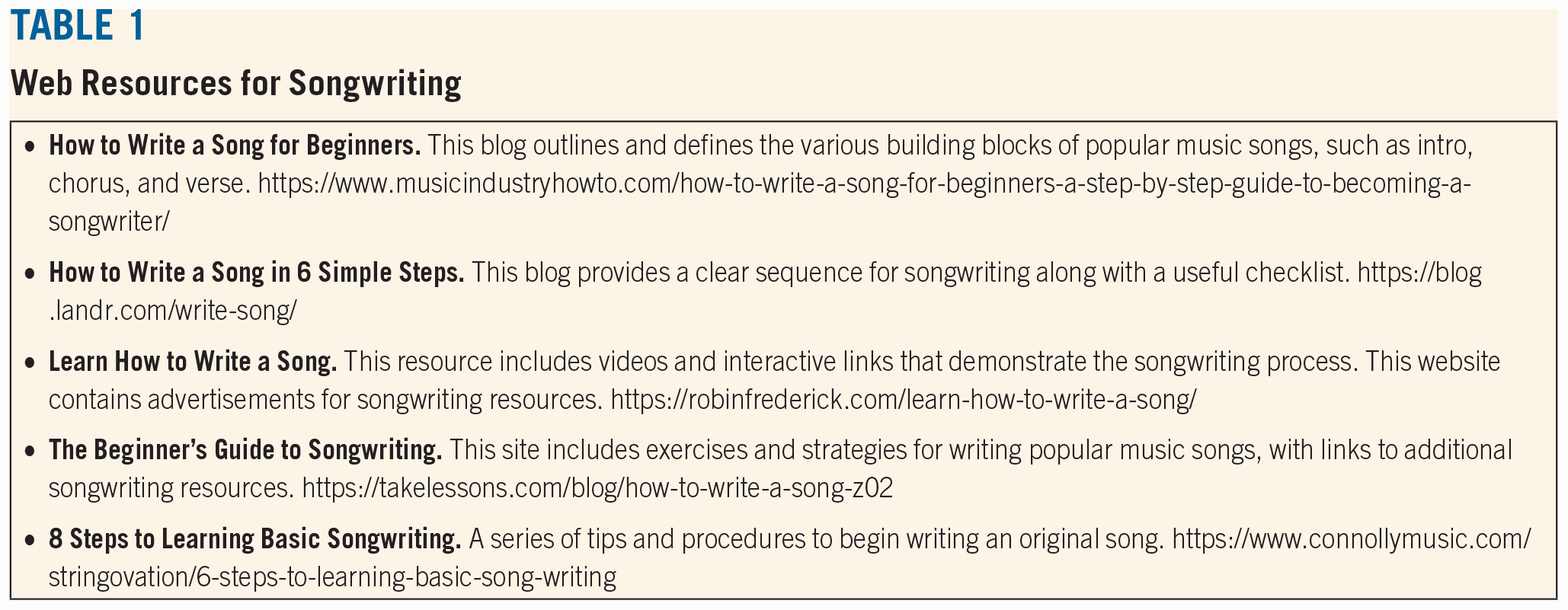
The procedures listed in this article are just some of many approaches to songwriting with iconic notation in a music technology classroom. Ideally, all music students engage in songwriting projects regardless of the classroom or ensemble experience. Music education scholars Michele Kaschub and Janice Smith edited a book titled Composing Our Future: Preparing Music Educators to Teach Composition that includes many examples of songwriting activities in general music, band, orchestra, and choir that may be useful to readers who primarily work in those settings. 19 Musicianship: Composing in Band and Orchestra by music educators Clint Randles and David Stringham focuses on creative activities in instrumental settings. 20 Table 1 is a list of valuable web resources that provide step-by-step directions for songwriting that may be useful in a variety of music classrooms.
Web Resources for Songwriting
Importance of Process
This article offered one model of songwriting activities using iconic notation in a music technology classroom. These procedures may be adapted for a variety of classroom environments, using whatever technologies and instruments are available in the individual setting. Technology is ever-changing; the approaches featured in this article may be accomplished through a variety of current software programs and apps and will presumably work with future apps as well. The activities presented here are not intended to be linear, because students may refine—or completely redo—each building block as the larger form begins to take shape. Keep in mind that songwriting requires vulnerability and trust. Establishing rapport and developing a safe learning environment are paramount. Students may also become overwhelmed by self-imposed pressure to produce the next big hit: it may be necessary to remind them of the importance of the process rather than the product. If students are worried their song won’t meet their own expectations, encourage them to brainstorm several bad song ideas. Chances are that at least one of those ideas will develop into something the student is really excited about. Sometimes students just need permission to fail in order to succeed in songwriting.
The inclusion of songwriting practices in a school music program may serve to complement traditional school music ensembles, offering more opportunities for all learners, and presenting opportunities for collaborations among songwriters and members of the band, orchestra, and choir. The suggestions in this article are not meant to replace existing curricula but rather to broaden school music offerings and increase student participation across the board. Scholars have outlined suggestions for digitally mediated songwriting collaborations that facilitate partnerships between songwriters and a variety of musical partners at the local, regional, and global levels. 21 Iconic notation, in the form of chord diagrams, keyboard charts, and beat grids presented in this article, may be the most appropriate choice for teaching popular music styles and is congruent with the new Core Arts Standards for music education. By providing all students with the opportunity to create music using notation that requires no prerequisite knowledge of music theory, music teachers may open doors for students who have not previously been served by our school music programs.
