



Abstract
Keywords
The understanding and use of visual models and diagrams, such as molecular structure and interactions between molecules, are important skills for success in science, technology, engineering, and mathematics (STEM) courses (Wu & Shah, 2004). Since diagrams, whether visual or tactile, are valuable tools for practicing scientists, both for problem solving and expressing understanding, they are a necessary part of STEM curricula (Cooper et al., 2017; Kozma & Russell, 2005). Indeed, even chemists with visual impairments (ie, those who are blind or have low vision) value diagrams and have taken the time to report the best methods they have found to make tactile versions of diagrams and images for success in post-secondary courses (Laconsay et al., 2020; Supalo & Kennedy, 2014). The importance of understanding visuals has been supported by a chemistry education research study, which found a correlation between visual model comprehension and the success of students in chemistry courses (Dickmann et al., 2019). Recently, it has been shown that development of comprehension is supported by drawing and sketching models (Stieff & DeSutter, 2021), but for students who are visually impaired, this “drawing-to-learn” method is severely restricted (Maneki, 2019; Zebehazy & Wilton, 2014). It has been hypothesized that an inability to master the comprehension of visual models leads students to drop out of science studies; by extension, this inability may also explain, in part, why students who are visually impaired do not feel enabled to pursue science careers (Laconsay et al., 2020).
If not done properly, the current shift from paper textbooks to digital media in classrooms could further reduce the science self-efficacy of students who are visually impaired (McKenzie, 2019). The digital screen enables students to explore and draw visual models of ideas that are impossible to directly observe. For example, students can now investigate abstract ideas, such as molecular interactions and chemical reactivity, through dynamic visuals on a screen and receive real-time feedback (Wegwerth et al., 2021; by answering questions on this article. For more information, visit:
http://my.aerbvi.org/AER-Store/Publications/BKctl/ViewDetails/SKU/AER
☑Earn CEs Online
When included, accessibility features to meet WCAG guidelines typically consist of alternative text for static images or keyboard controls and audio cues for interactives (World Wide Web Consortium, W3C, Web Accessibility Initiative, n.d.). These adaptions primarily rely on audio feedback, which, if paired with only verbal instruction such as text-to-speech or lecture, is arguably inadequate for learning new concepts in chemistry. Based on a review of case studies of students who are visually impaired in chemistry courses, it was recently concluded that “proper accommodation requires the use of tactile and audible materials” (Teke & Sozbilir, 2019, p. 891). Likely, the tactile and audible materials act like visuals, which are believed to be valuable for novice chemistry students, since they provide a concrete object that can be connected with and used to explain imperceptible concepts (Stieff & Ryan, 2013). This concept aligns with cognitive science's Dual Coding Theory, which predicts that when a concept is dually represented with both a verbal (eg, the word “atom”) and a visual (eg, a diagram of an atom) cue, it is more easily learned and recalled (Paivio, 1990; Stieff & Ryan, 2013). Ainsworth (2006) extends this assumption to learning with multiple external representations, to include any combination of two or more external representations that complement each other or constrain each other's interpretation. Therefore, a more comparable learning experience for students who are visually impaired could be provided with a tool that provides both tactile and audio feedback, which indeed has been shown to increase an individual's ability to visualize representations (Grabowski & Barner, 1998).
Digital interactives, defined herein as dynamic virtual environments that allow users to manipulate set variables and receive feedback, are becoming increasingly commonplace in the classroom. To bridge the gap of effectiveness of digital interactives between sighted students and students who are visually impaired, we proposed and built the Kasi Learning System. Kasi replaces the screen-and-mouse user interface with tactile manipulatives and audio feedback to provide a multisensory experience. The core design of the Kasi system is the interlinking of three components:
a digital interactive, complete with a pedagogy and formative assessment; tactile magnetic pieces that match the digital interactive's user interface; and audio feedback provided through a combination of computer vision and audio-based augmented reality algorithms.
Computer vision is a process that can be used to program a computer to extract and analyze information from an image. Kasi uses computer vision to detect the tactile pieces in images captured by an external webcam.
To use Kasi, the pieces are placed on a magnetic whiteboard positioned under a webcam that is connected to a computer running the digital interactive through a web-browser, as shown in Figure 1. Students can use the manipulatives to build, explore, and apply science diagrams. On command, Kasi uses computer vision to “read” the pieces and input the image into the digital interactive. Then augmented reality software provides audio feedback to the student. In essence, Kasi (which is the Finnish word for hand) allows inexpensive tactile pieces to “talk” to students and control the digital interactive. Additionally, the pieces, which are visually appealing and comprehendible, can readily facilitate participation and communication using diagrams between students who are visually impaired with their sighted peers and instructors and vice versa.
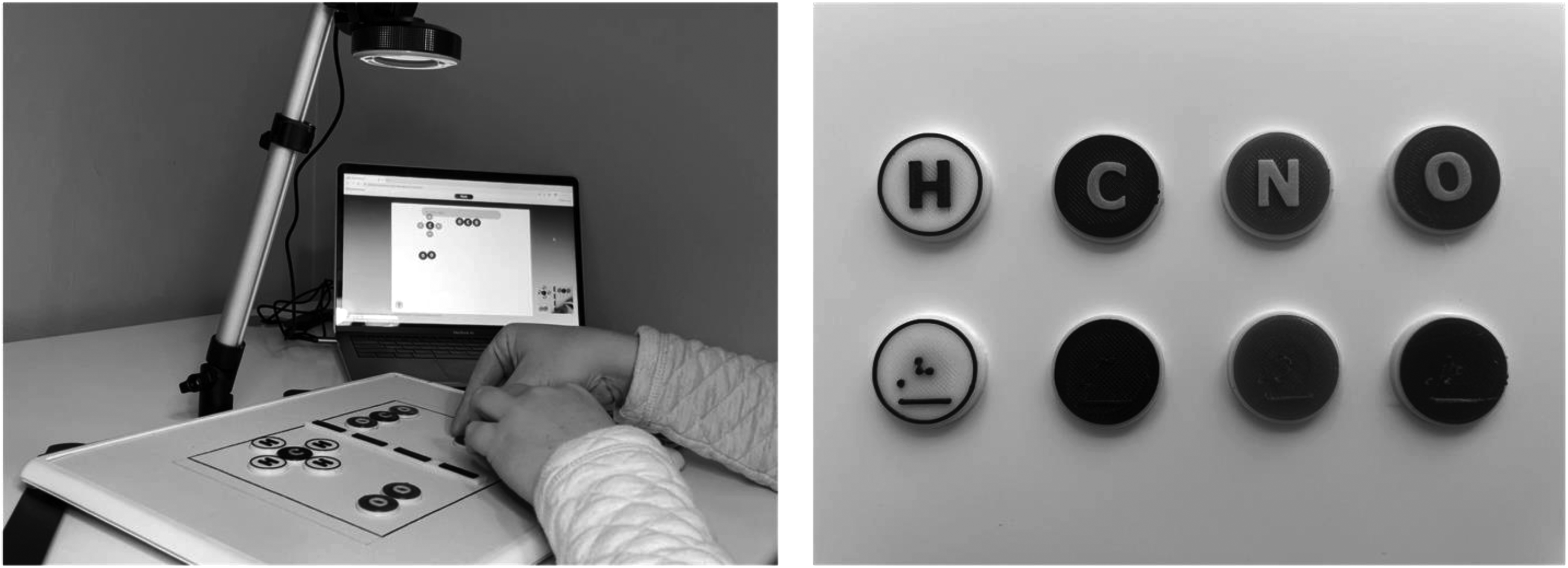
A photograph of the Kasi learning system in use (left), and a photograph of the atom pieces (right). Note. The braille for “C,” “N,” and “O” are the same color as the background, which is why the braille is not visible in the photographs.
The study presented in this article sought to investigate the initial feasibility and usability of a prototype of the Kasi Learning System for supplementing high school chemistry courses. The prototype adapted an interactive for balancing chemical reactions using particle diagrams. To investigate Kasi's usability, participants, high school students who are visually impaired, used Kasi during an active learning session where instruction was intertwined with prompts. After an introduction to the tactile pieces and topic, half of the participants completed the lesson under the guidance of an in-person instructor (the interviewer), while the other half completed the lesson using Kasi. The primary research questions were:
How do users manipulate and interact with the physical pieces? What is the effect of adding audio-based augmented reality to physical manipulatives on the independence of students? How is using Kasi equivalent to and how is it different from an in-person instructor?
Method
Materials
Prior to recruitment, the study was reviewed and approved by Sterling IRB. A survey of high school chemistry textbooks was used to devise the pedagogy for the active learning lesson. The learning objectives for the lesson were:
construct models of molecules from individual atoms; build a balanced chemical reaction for the reaction described.
To complete the lesson, students used Kasi's tactile pieces which include 3D-printed circles to represent the atoms hydrogen, carbon, nitrogen, and oxygen (Figure 1). The circles were about the size of a quarter and color coded by atom type following chemistry's designated system for particle diagrams. Additionally, the pieces were labeled with their atomic symbol. To keep the pieces smaller, two sets were made, one with braille and one with a large-print letter that is embossed due to the 3D printing process. All pieces of this prototype set were 3D-printed due to the availability of manufacturing methods during research and development. Readability was confirmed by a consultant, who was a recent college STEM major with congenital blindness. Each set contained eight white hydrogens, labeled “H”; four black carbons, labeled “C”; eight red oxygens, labeled “O”; and four blue nitrogens, labeled “N.” The remaining hardware, a whiteboard, webcam, and laptop computer were off-the-shelf items.
To enable Kasi to deliver the lesson, prompts in the pedagogy were pre-written and embedded into Kasi, then delivered using the Web Speech application programming interface (API) for text-to-speech services to provide audio feedback (Mozilla, n.d.). Students used keyboard controls to activate audio prompts and check their work. Commands to navigate through the pedagogy included the down arrow to repeat a prompt, the left arrow to go back to the previous prompt, and the right arrow to advance to the next prompt. To activate the computer vision and audio–augmented reality, the space bar read the board and provided a description of the image, and the up arrow checked the student's answer and provided a hint if incorrect.
Procedure
Both teachers of students with visual impairments (TVIs) and students participated in the study to provide a more comprehensive understanding of the feasibility of Kasi. TVIs observed their student or students using Kasi and provided feedback in a semi-structured follow-up interview. Students participated in an active learning lesson over the course of two sessions. During the first session, students learned how to use the materials and practiced building molecules and balancing chemical reactions. For the second session, usually on a second day, students completed one review problem on balancing chemical reactions. During the lesson, the researcher took on the role of in-person instructor and delivered the pedagogy for the sections in which Kasi was not used. All researchers are experienced chemistry instructors and led the lesson to improve consistency in delivery of the pedagogy.
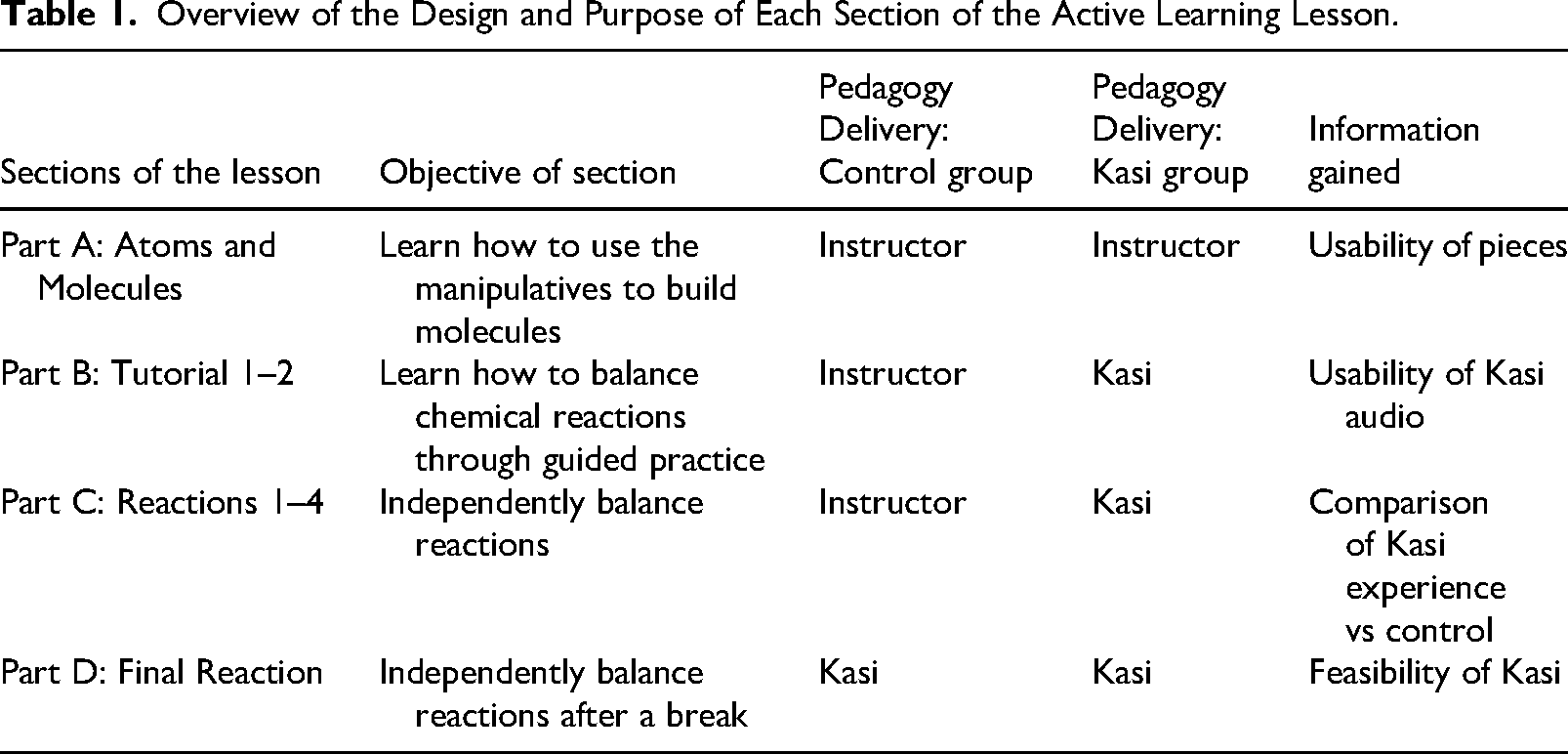
Since accommodations for students with visual impairments are individualized based on students’ need and availability of resources, there is no standard method to which Kasi can be compared, thus, a need for a control group was determined. To identify which differences are a direct result of the full Kasi system versus the Kasi pieces alone, an underpowered randomized control study was designed. During recruitment, students were surveyed about their visual acuity and the science courses they had completed. This information was used to make pairs of similar students. One student from each pair was randomly assigned to the control and the other to the Kasi group. The researchers then traveled to students’ schools to lead the active learning lesson. Both groups started with using just the tactile pieces and following directions given by the in-person instructor (Table 1). Introduction of the full system was staggered between groups. After the lesson, each student participated in a semi-structured follow-up interview. Both the active learning lesson and follow-up interviews were video- and audio-recorded. All data were de-identified prior to storage and analysis.
Overview of the Design and Purpose of Each Section of the Active Learning Lesson.
Participants
Students were sourced through statewide outreach to TVIs in Minnesota and Michigan, and at a school for blind students. Inclusion criteria for students were as follows:
they were enrolled at a high school, they received accommodations for blindness or low vision, and they had no serious cognitive or other sensory disabilities that would affect their ability to use Kasi as determined by their assigned TVI.
Prior to engaging in research activities, assent and consent were collected for all participants. A total of 10 students who had varying degrees of vision and experience in chemistry were included in the study. Five participants attended the same school for blind students, and their science TVI participated. The other five students attended a local public school, four rural and one suburban, and their assigned TVI participated in the study. Four students had completed a chemistry course, whereas the remaining six were currently taking or had not yet taken a chemistry course. The study took place during a fall semester, which is typically prior to the coverage of balancing equations for those enrolled in chemistry. Visual acuity varied between participants: two were blind with no light perception, two had profound visual impairment (Snellen visual acuity = 20/500 to 20/1000), five had severe visual impairment (Snellen visual acuity = 20/200 to 20/400), and one had moderate visual impairment (Snellen visual acuity = 20/70 to 20/160). During the study, four participants chose to use the braille-labeled pieces and the other six opted for the large-print pieces.
Analysis
The usability of Kasi was evaluated based on student activity during the active learning session and answers to Likert questions during the follow-up interview. Each session recording was reviewed, and specific events were tallied. Events included: additional hint provided, incorrect answer submitted, and Kasi activation to read board or repeat the prompt. Notes were also taken to record error types, if Kasi hints were helpful in guiding students to the correct answer, and instances when additional reminders regarding the keyboard controls were needed. For each set of prompts, the percentage of correct answers submitted was calculated to give a score. Scores were used to assign a relative proficiency value for cross-comparison of demonstrated student ability for each section of the activity. Proficiency definitions were as follow: high proficiency was a score greater than 90%, medium proficiency was between 75 and 90%, and low proficiency was less than 75%.
The active learning lesson was split into four sections, Parts A–D (Table 1). Due to the low-incidence population and underpowered nature of this study, data was analyzed through qualitative comparisons between the control and Kasi groups.
Answers to Likert scale questions were tabulated and averaged. Student and TVI interviews were reviewed, and key quotes transcribed. These data were used to help understand observations of student use and feasibility of the system in educational settings.
Results
Active Learning Lesson
There were five participants in the control group and five participants in the Kasi group. In each group, two participants chose to use the braille-labeled pieces and three chose to use the large-print pieces.
In Part A, the procedures for both groups were identical. Participants were presented with Kasi's physical manipulatives as the concepts of atoms and molecules were introduced by an in-person instructor who provided verbal instructions on how to build various molecules. All students who selected to use the large-print pieces were able to correctly identify each atom and place it on the board when prompted. The participants who opted to use the brailled pieces at first struggled to distinguish between the 3D-printed “O” ( ) and “N” (
 ) braille, since these letters are similar in braille and differ by only the presence or absence of dot 4. Two of the TVIs confirmed that they have found braille stickers to be easier to read than 3D-printed labels; based on these findings, other methods to create braille letters will be investigated. Three braille users were able to adapt and identify the pieces reliably throughout the activity, while one occasionally asked for verification that the intended piece was being used.
The identical procedures for Part A provided an opportunity to compare the participants’ relative proficiency for completing each prompt between the two groups. In the Kasi group, three out of five participants demonstrated low proficiency whereas the control group had zero participants demonstrating low proficiency. In each group, one demonstrated medium, and one demonstrated high proficiency. This finding indicated that direct comparison between groups would be difficult as student abilities appeared to be unbalanced between groups.
Part B of the lesson consisted of two tutorials on how to construct representations of and balance chemical reactions. Completing the tasks for this section was more dependent on following directions than applying conceptual knowledge, providing an opportunity to evaluate the impact of the audio component of Kasi. For Parts C and D, participants followed instructions to build specific chemical reactions, then were prompted to balance the reaction. Balancing required problem solving and applying concepts learned in Part B. Part C served as a comparison for experience between the two groups. After a break, typically one day, all participants used the full Kasi system to complete Part D.
The clearest trend was uncovered by plotting the average score for each group, shown in Figure 2. To account for the lower proficiency of participants in the Kasi group and change in difficulty between prompts, comparison of the difference between the average scores was the focus of analysis. The control group had a higher average score throughout Parts A–C. Besides Reaction 1, the difference between the lines remains relatively constant. Between Reactions 3 and 4 at the end of Part C, the difference begins to decrease significantly. Then, at Part D the Kasi group has a higher average score.
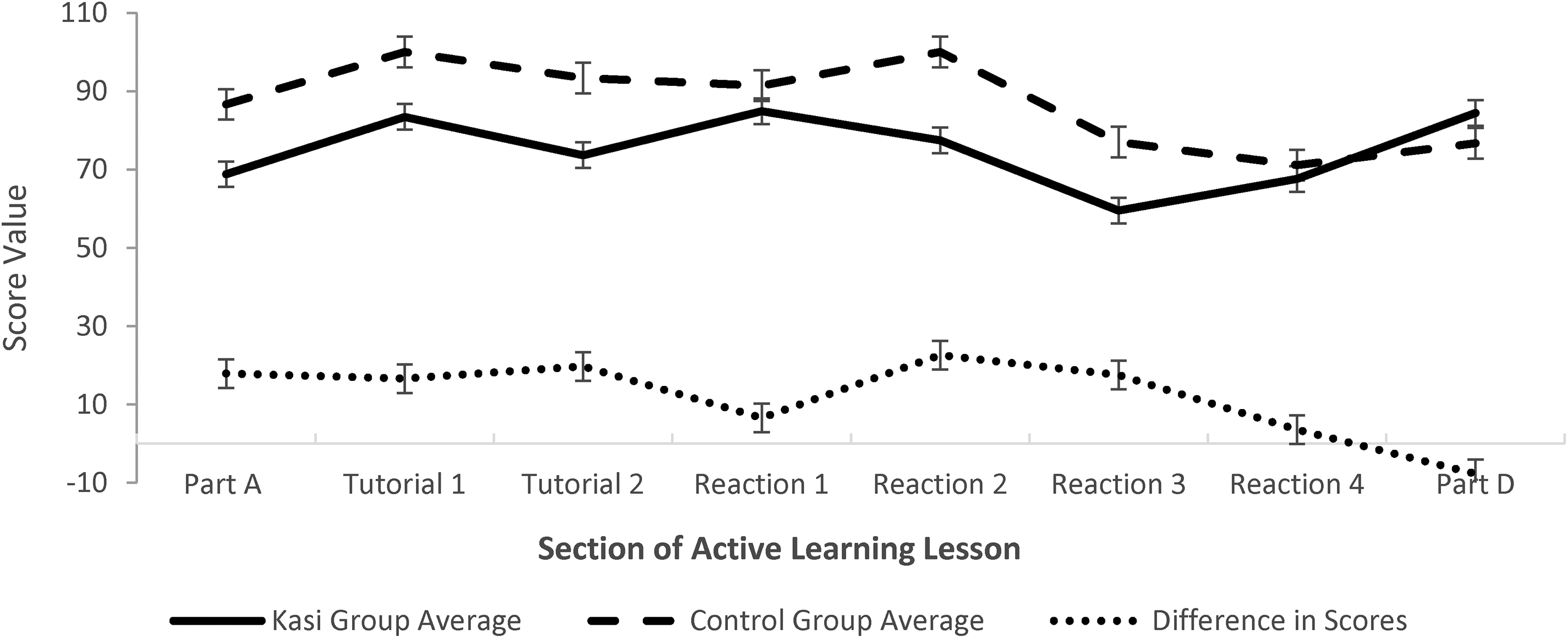
Average scores during the active learning lesson. Note. The solid line plots the average scores for the Kasi group. The long-dashed line plots the average scores for the control group. The short-dashed line at the bottom displays the difference in average score for the control and Kasi group. Part B includes Tutorial 1 and Tutorial 2. Part C includes Reactions 1 through 4.
Follow-Up Interviews
To measure impressions of the prototype, students were asked five Likert scale questions regarding use of Kasi (Table 2). All participants either strongly agreed or agreed that they would recommend Kasi to other students. Similarly, 9 of 10 students strongly agreed or agreed with each of the statements that Kasi is enjoyable, is easy to use, and has easy-to-understand audio. For each of the aforementioned prompts, one student, which varied for each prompt, was neutral. Upon probing why neutral scores were given for enjoyment and ease of use, students said it was because of a couple technical bugs that were encountered during use. In probing the neutral response regarding ease of understanding voice prompts, the student reported difficulty hearing the synthetic speech but the ability to repeat prompts helped significantly. Students also did not find the lesson hard to complete because of the tactile manipulatives except for one who did not offer additional explanation for the rating. In looking at average scores for responses (Table 2), relatively larger differences were found between braille and print letter users than comparing the control and Kasi group. The biggest differences were that the braille users found it easier to understand the voice prompts, the pieces did not make the lesson difficult to complete, and these students enjoyed using Kasi more than those with low vision.
Averages for Students’ Responses to Follow-Up Likert Question.
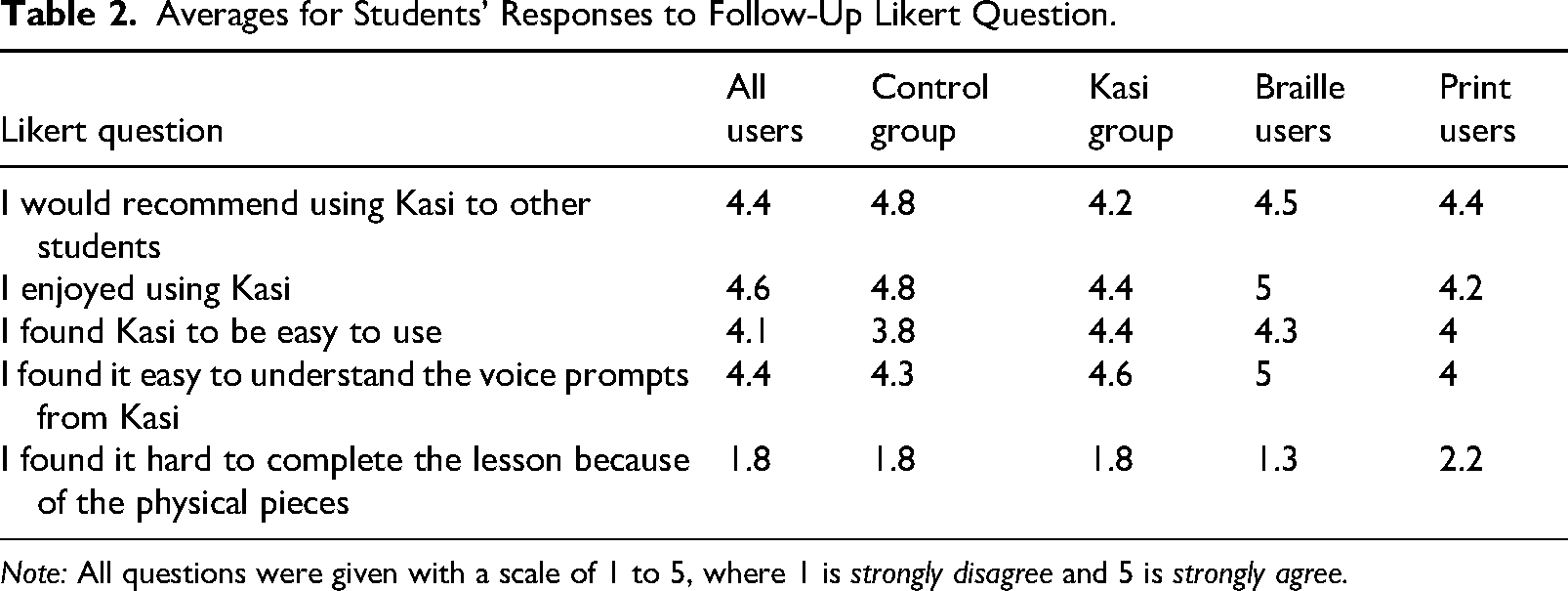
Note: All questions were given with a scale of 1 to 5, where 1 is strongly disagree and 5 is strongly agree.
Discussion
In hindsight, the underpowered randomized control study was perhaps a naïve approach: as learned firsthand during data collection, students who are visually impaired are diverse in terms of abilities, preferences, and attitudes, resulting in a vast number of variables that make direct comparisons between students difficult. In terms of the usability of Kasi, it was noted there were significant differences between participants who opted to use the braille pieces versus those who chose the large-print pieces. The discussion in the next section highlights when differences between the control and Kasi groups or the braille and large-print users were more significant.
How Do Users Manipulate and Interact With the Physical Pieces?
Throughout the lesson, differences were observed between the four students who opted to use braille versus the six who used large-print pieces. Those that chose braille relied on touch to determine both the identity and arrangement of the pieces and did so with higher accuracy. Conversely, the large-print users relied on vision, even if just a pinhole, to look at the pieces when identifying and arranging the atoms. This vision use posed a challenge when making sure the atoms were touching—which is necessary for the computer vision to recognize a molecule—due to the low contrast between the white borders of the pieces and the white board on which they were placed. As some students became more familiar with the pieces, they began relying on their sense of touch to identify the atoms based on the embossed large-print letters throughout the activity. Despite some initial challenges, during the follow-up interview, nine of the participants indicated that the physical pieces did not make the lesson harder to complete.
Braille users also reported stronger disagreement with the statement, “I found it hard to complete the lesson because of the physical pieces.” This finding is likely a reflection of the frequency with which each group uses tactile resources and are accustomed to relying on touch. As one participant who was blind with no light perception explained, [K]eeping track of the pieces for the bigger ones was tricky but not hard. [I] had to keep a mental image in [my] head but [it was] super helpful that the magnets kept the pieces from moving which makes it easier to count and read them.
This statement contrasts with those of students with low vision, who reported that they could produce drawings and use them for problem solving, thereby reducing the need for Kasi's tactile pieces. Yet, many others, including TVIs, recognized the value of using manipulatives during learning and voiced the belief that the pieces could be beneficial for all students, not just those who are visually impaired.
What is the Effect of Adding Audio-Based Augmented Reality to Physical Manipulatives on the Independence of Students?
Comparing the performance of the control group to the Kasi group after the introduction of the audio component of Kasi, delivering instructions through a computer versus a human appears to have little to no effect. In Figure 2, the gap between the average score between the two groups remains relatively constant from Part A, where procedures are identical, through Part B, the tutorials. This finding suggests that delivery of the pedagogy through the system is as useful as in-person instruction.
Additional findings come from comparing the braille users to the large-print users. All four participants who read braille strongly agreed (gave a score of 5 on a 5-point scale) that they could understand the audio prompts, whereas large-print users on average just agreed (4 on a 5-point scale) with the statement. During the lesson, it was noted that large-print users in the Kasi group repeated the audio four times more often than the braille users. These findings are presumed to be a reflection of tools regularly used by each group of students. The students who used the braille pieces also regularly used a screen reader and are thus more accustomed to listening to the directions and feedback, especially regarding the robotic nature of synthetic speech. Contrarily, some students who relied on vision exhibited an aversion to listening to Kasi. Interviews with TVIs support this hypothesis. One TVI noted that synthetic speech can be a barrier for students because, “[T]hey don’t even wanna listen to it…. [K]ids that have partial sight or are legally blind, but not completely blind, that is a huge hurdle to get past.” Similarly, a student expressed that using Kasi was different because, I had to listen. That was really weird for me . . . I'm a visual [person]. I use my eyes more [than my ears]. For Kasi, I use my ears, so it's a lot different for me.
Even though some students appeared to struggle to listen to the synthetic speech at first, they appeared to adapt, and eventually perform as well as others. However, it is also recognized that students are more likely to use a learning tool if it provides an enjoyable experience. Kasi is envisioned to be improved by exploring options to tailor the synthetic speech to meet the user's preference.
How Is Using Kasi Equivalent to and How Is It Different From an in-Person Instructor?
It is envisioned that the first versions of Kasi will be used during in-class activities, where the instructor is moving around the room. In this case, a student with visual impairment could use Kasi to access the digital activity and submit answers independently, but also raise his or her hand for additional help, as needed, in the same way as the rest of the class. In terms of delivery of the pedagogy and instructions, some students with visual impairments who do not regularly use screen readers struggled to listen to the synthetic speech initially. This challenge seemed to be overcome by repeating prompts. Students also reported liking the ability to control the prompts and pace with keyboard controls and found them intuitive.
The biggest difference was the ability for the in-person instructor to provide tailored hints and guidance based on students’ answers. Currently Kasi hints are based on correcting the most common incorrect answers. Even so, 57% of hints given by Kasi were followed by students submitting a correct answer. As the system is further developed, it is hoped that “smart hints” can be included, especially those that can ask a student to check the position of specific pieces for unintended errors due to placement of pieces.
Interestingly, Kasi users demonstrated increased engagement with the activity and submitted more answers than the control participants. It is hypothesized that this discrepancy is due to students being more willing to attempt different solutions when submitting responses to a computer rather than to a human. If this hypothesis is true, then a secondary hypothesis is that the ability to learn through experimentation led to greater learning gains for the Kasi users. From Figure 2, it is remarkable to see how Kasi average scores significantly improved from Reaction 3 through the end of the lesson even though the prompts were getting harder. After the break between sessions, the students in the Kasi group scored higher on average than the control group. In contrast, the control group's average stayed relatively constant from Reaction 3 to the end. Even the TVIs and researchers noted their surprise of watching some students from the Kasi group struggle with the concepts of building molecules and balancing chemical equations through Parts A-C, then come back later to Part D and solve the problem with little to no challenge. The improvement of Kasi users from Part A to Part D indicates that Kasi may be a useful learning tool, and it will be further investigated in an efficacy study spanning a whole year of chemistry.
Finally, in response to the question, “What do you like about Kasi?”, students highlighted Kasi's hints and feedback system, the audio responses, that it was fun and easy to use, helped with learning, and could be used by all students regardless of visual ability.
Implications for Practice
How students who are visually impaired access visual materials varies greatly, as does their comfort level in using different tools. From our usability study, we have observed that Kasi is most readily adapted to and used by those who are blind. The more functioning vision a student has, the more effort that was required to acclimate to and use the tactile and audio features of Kasi (Lloyd-Esenkaya et al., 2020). Based on our limited findings, we are encouraged that the learning curve to using the tool appears to be short—by the end of Part D, all participants in the Kasi group were able to use the system efficiently to balance chemical reactions.
In interviews, TVIs also voiced that their students with low vision often have underdeveloped auditory skills. Many also stated the need for tools like Kasi to be incorporated into these students’ learning programs earlier, so that when they reach secondary courses, the grades of which are important for applications to higher education institutions, their tactile and audio skills Kasi utilizes will be well developed. As one TVI highlighted, “[F]amiliarizing them with voice output would be an added benefit of using [Kasi] and getting them comfortable with that technology.”
Beyond knowledge acquisition, a system like Kasi has the potential to help students feel included and able to persist in STEM courses (Laconsay et al., 2020). The resources students use often make them feel different or belittled, as one TVI put it, I feel bad for kids that are low vision because so many things are visual and you can’t always pull out something tactile that doesn’t look like second grade little yellow cubes and bars. . . . [I]t's nice to have an adultish looking item.
Additionally, Kasi generates images that sighted peers and instructors can readily read, which is important for fostering inclusion, unlike a purely braille tactile diagram (Laconsay et al., 2020). Another TVI noted the potential Kasi has to improve self-esteem and support meaningful participation of students with visual impairments in group work. It is important for them to have independence and feel good about what they can do, this could help them gain confidence in using [their] auditory channel. Also would help [them] be a part of group settings rather than wait and not get a part to play.
Developed using the Universal Design for Learning Framework (CAST, n.d.), Kasi is a system with a goal of providing an essentially equivalent experience to students regardless of their visual abilities.
Limitations
The study presented utilized an early prototype of the Kasi Learning System, with a high-level goal of answering the general question, “Can it work?” (Bowen et al., 2010), which is answered based on findings to the research questions presented earlier in the manuscript. Inherently, the study has limited external validity in exchange for a time- and cost-effective method for testing for proof-of-concept. As such, there are limitations to the study design and methods.
Regarding demographics, sufficient information to clearly define students’ degree of visual field loss, etiology of visual impairment, and accommodation preferences (eg, enlargement of images versus tactile representation and frequency of use of a screen reader) was not collected. To respect participants’ privacy, researchers did not ask to see or be given specific information from students’ individualized education programs (IEPs). Rather, the research team described the Kasi system and the inclusion criteria to the TVIs, who then identified students who would fit the study. Although no additional disabilities that could affect the use of Kasi were reported or noticed by the research team, it is possible that some participants had additional disabilities that were not disclosed. Due to the limited demographic information collected, a detailed understanding of how a student's profile relates to the usability of Kasi could not be gained. Additionally, due to the small sample size and large number of variables between students, including vision level, grade, science background, type of school the students attended, and motivation, the results of this study are not generalizable. The findings reported herein are indicators of what parts of Kasi can work and where improvements should be made.
Unintentionally, usability regarding readability of the pieces may be obscured due to the use of a 3D printer. All pieces of this prototype set were 3D-printed due to the availability of manufacturing methods during research and development. Although the braille-labeled pieces had been tested with a consultant who is congenitally blind, the pieces labeled with large print were not tested with a low vision consultant prior to the study. Due to the 3D printing process, the large-print letter ends up being embossed because the letter is a different color from the background and, therefore, needs to be printed as a separate layer. However, the letters were large print so that students with low vision could read the pieces. Additionally, the contrasting backgrounds of the pieces also appeared to be useful for some of the students with usable vision. It is possible that the embossed nature of the print letter presented an unfamiliar medium to the participants with low vision and affected their experience with reading the pieces. Similarly, the braille users may have struggled unnecessarily to read the pieces, since braille produced using a 3D printer can be more difficult to perceive. Work is currently underway to create flat pieces to which clear braille label stickers can be affixed on top. Usability may also have been affected by the limited ability for students to tailor the synthetic speech to their preferences.
The students’ use of Kasi described in this article was conducted outside of a chemistry course and in a short time frame. Therefore, this study cannot make any claims about feasibility in an authentic classroom setting or long-term effects. Finally, the results are limited to visuals that are 2D representations; further work would be needed to investigate the feasibility of using Kasi to connect 3D visuals to 2D representations.
Future Research
Based on this usability study, improvements to the usability and feasibility of the Kasi system will be made. The pedagogy will be expanded to cover an entire general chemistry course. To support new diagram types, additional pieces will be designed and produced. These improvements will be iteratively developed and evaluated through a usability and feasibility study. The final product will be evaluated in a pilot study that will utilize a multiple baseline single-case design. The low incidence of students who are visually impaired (National Center for Education Statistics, 2021) makes conducting experimental group design studies with adequate statistical power cost prohibitive (Odom et al., 2005). To date, the majority of research focused on interventions designed for students who are visually impaired has employed single-case designs (Sutter et al., 2020). A multiple baseline single-case design is particularly appropriate for the proposed future study. Because there is variation in the degree of sightedness across students with visual impairments, such a design will provide information on the effectiveness of Kasi for students with different profiles, which could potentially be otherwise obscured in an under-powered group design approach (Horner et al., 2005; Kazdin, 2010). This study will evaluate the extent to which Kasi improves the science self-efficacy and chemistry content knowledge of students who are visually impaired in high school general education chemistry classrooms.
Footnotes
Declaration of Conflicting Interests
The author(s) declare the following competing financial interests: The Kasi Learning System is a product of Alchemie Solutions. Authors Wegwerth, Manchester, and Winter have received compensation for work performed as employees of Alchemie Solutions.
Funding
The author(s) disclosed receipt of the following financial support for the research, authorship, and/or publication of this article: Funding for this project was provided by the Institute of Education Sciences, U.S. Department of Education, through the Small Business Innovation Research (SBIR) program contracts #91990021C0031 and #91990018C0001 to Alchemie Solutions, Inc. The opinions expressed are those of the authors and do not represent views of the Institute of Education Sciences or the U.S. Department of Education.
