



Abstract
iPads are becoming increasingly prevalent in schools and offer significant potential as both a compositional and pedagogical tool in general music classes. In this article, I discuss a composition activity that I implemented with general primary/elementary music classes in Australia. This activity involved using iPads, namely the apps iMovie and GarageBand. I identified several potential benefits of the iPad, which I attributed to its portable, functional and accessible design.
Keywords
In most of the schools in which I have worked as a music teacher, students and teachers have had access to iPads in some capacity. Through using this technology in various ways, I have observed that iPads may have the potential to enhance student learning and engagement in general primary/elementary music classes. In this article, I focus on a teaching and learning activity that I implemented with students in Year 5 (10- to 11-year-olds) in an Australian school. At this school, students in Year 5 are fortunate enough to have access to their own iPad. However, this activity could be successfully implemented with other age-groups and with fewer iPads shared between small groups of students. Alternatively, other devices, such as tablets using the Android or Windows operating systems, may be used for a modified version of this activity. However, I will not be discussing this option, due to the focus on the apps of iMovie and GarageBand in this article. Students at this school are well-versed in using iPads and the plethora of educational apps available on them. To enhance their learning and engagement, through providing them with a somewhat authentic music production experience, I used iPads for an activity in which students were required to plan, create, present, compare, and reflect on the music they collaboratively created for an animated cartoon.
iPads in Music Education: The Literature
The first iPad was launched in 2010 as a product that offered something in between the function and size of an iPhone and a MacBook (O’Boyle, 2019). Since then, various versions of the iPad have been released as well as new models including the iPad Mini, iPad Air, and iPad Pro. The number of apps available on the Apple App Store has also grown exponentially throughout the past decade. As of February 2019, there was approximately 2.2 million iOS apps available on the App Store (Costello, 2019). Evidently, iOS devices like iPads have become an increasingly important technology in our lives, and education professionals have recognized this with the number of schools using iPads steadily increasing (Hart, 2018).
It is unlikely that iPads will be disappearing from the educational landscape anytime soon. At least within the short term, they are only likely to become more prevalent. The onus is therefore on us as general music teachers to upskill ourselves with this technology so that we can effectively use it to enhance student learning. While there is a significant amount of literature discussing iPad use in music education in the form of blogs, websites, and YouTube videos, only a modest number of peer-reviewed publications directly explore this issue. Some of these are discussed below.
Riley (2013) and Reese et al. (2016) explored how preservice music teachers use iPads, particularly during their professional experience placements. Through analyzing their reflection papers, Riley (2013) found that preservice teachers at the University of Vermont used iPads in a variety of ways, including for “rehearsal/performance assistance, creating music, teaching instruments, providing virtual instruments, audio/video recording, listening resources, and organizational support” (p. 83). Moreover, she noted that they had made many positive comments regarding iPads and concluded that this device had benefited their pedagogical practice. Similarly, Reese et al. (2016) found that many of the preservice teachers involved in their study perceived technology, such as iPads, “as a successful tool to engage students in creating and performing, to remove barriers that may prevent some students from creating and performing, and to create a supportive environment for students to build confidence in their abilities” (p. 107).
In another article, Riley (2016) explores six iPad apps that can be used for creating activities in general music classes and provided some sample lesson plans. Her purpose was to provide information and lesson ideas to general music teachers so that they can make more informed choices regarding technology. These apps include LoopsequeKids, Moozart, Singing Fingers, Bloom, Finger Stomp, and GarageBand. Riley selected these apps because she considers them to be of high quality, accessible, and suitable for a variety of ages. She concludes that “The possibilities for effectively and creatively applying these apps for improvising, arranging, and composing with students are endless” (p. 9). Similarly, in this article, I focus on how two iPad apps can be used creatively within a teaching and learning activity for general music classes.
The use of iPads within the context of music ensembles has also been discussed by researchers (e.g., Martin, 2014; Verrico & Reese, 2016; Williams, 2014). Williams (2014), for example, argues for recognition of the iPad as “a real musical instrument” and discusses what he has learnt about the potential this device has for music education practice, and ensemble pedagogy particularly (p. 93). Reflecting on his experiences using the iPad within an ensemble called “Touch,” he notes that this ensemble shares much in common with popular music groups in that “It is a cooperative, interactive, and democratic process of music-making” (p. 96). Moreover, he observes, that this ensemble differs from the large traditional school ensembles of orchestra, band, and choir because it emphasizes the autonomy of individual musicians, it is relatively small in size, the music is learned primarily by ear, and the concerts are interactive and more like shows. He contests that this pedagogical model has the potential to engage students who may not be particularly interested in large traditional school ensembles.
The potential benefits of iPads for students with disabilities and special needs, within the context of music education, have also been discussed (e.g., DeVito, 2017; Hillier et al., 2016; Nelson, 2013). For example, Nelson (2013) explains how she has made use of the iPad to cater for the needs of students with severe disabilities in her music classes, focusing particularly on the app MyTalkTools. As many of her “students do not talk, but rather communicate via eye gaze, touch, or simple physiological changes,” she became interested in this particular app because it is accessible, cost-effective and well suited to music pedagogy (p. 27). She argues that it is ideal for visual learners with cognitive disabilities, as images and videos can be uploaded in real time. In her classes, she has used this app for several purposes, such as identifying orchestral instruments, matching the melodic contour with a picture or video, and to ascertain students’ musical preferences. Overall, she found that this app helped to motivate students in her music classes who had “never actively participated independently for the past seven years” (p. 28).
Hillier et al. (2016) discuss the benefits of a technology-based music program for students and young adults with autism spectrum disorders (ASD). This program, titled “SoundScape,” involved participants engaging in a variety of music-related activities, several of which involved iPads (p. 271). The authors found that iPads had a more positive impact than the desktop computers used in previous years, as the iPad’s touch screen and portable nature helped foster social interaction. They conclude that this “programme presents a strong case for utilising technology as part of a school-based music curriculum as a way to reach the non-traditional learner” (p. 278). The literature above suggests that iPads have significant potential to assist students with disabilities and special needs engage in a variety of music education activities.
Several studies have also been published in which researchers explore iPad use within different music education settings, such as schools and choirs (e.g., Brown et al., 2014; Hart, 2018; Ruismäki et al., 2013). Ruismäki et al. (2013), for example, focus on the expertise of a single music teacher who is considered to be an expert in music technology in Finland. Through interviewing him, the authors found that he adopts “a solution-centred approach” to his use of the iPad in music education (p. 1088). They discuss how he uses a variety of apps on the iPad for purposes such as recording rehearsals, viewing music notation, slowing down audio recordings, arranging and composing music, teaching music theory and structures, and performing on digital instruments.
Hart (2018) explores the effectiveness of iPad apps, in creating and performing activities, during two afternoon music lessons with a Year 5 primary class. Having taught the lessons himself, he concludes that the use of iPads allowed students in this class to “engage with higher order skills such as improvisation, and the manipulation of musical dimensions” (p. 318). Musical dimensions refer to the musical elements or concepts, such as pitch and rhythm. Last, Brown et al. (2014) investigates how iPads can be used to make music composition activities more accessible and engaging at a school focused on providing education to Indigenous Australian students. This project explored the iPad app GarageBand and aimed to help build resilience and self-confidence in students. After analyzing a variety of quantitative and qualitative data, such as questionnaires and interviews, they conclude that staff and students at this school were “enthusiastic about using the tablet computers and music apps and that their ease of use is making previously unimagined music production activities accessible” (p. 80).
As demonstrated above, a number of promising uses of the iPad have been identified in the music education literature. However, overall, there is little empirical research examining how iPads are currently being used by inservice music educators and the impact this is having on student learning and engagement in general music classes. Further research in this area would be beneficial. While not a research paper, the following section describes one way in which I (an inservice general music educator) have employed iPads in my teaching practice with the intention of enhancing student engagement and learning. Like the authors cited above, I too have found iPads to be a useful form of technology for music education practice.
Two Types of Sound in Film
The activity described in this article was part of a larger unit exploring music in animated films and cartoons. Prior to beginning the task, students were introduced to some key concepts. This primarily involved discussing the two main types of sound used in film and animation: diegetic and nondiegetic. As Dykhoff (2012) observes, every film has its own world, its diegesis. Diegetic refers to all sound that originates from within the world of the film (e.g., footsteps, a kettle boiling, or an explosion). Nondiegetic refers to sound that is added and does not originate from within the world of the film. Two purposes of nondiegetic sound were discussed with the students, including music used to create mood and atmosphere (also known as “underscoring”) and music that mirrors the action on screen (commonly known as “Mickey-Mousing”). Particular attention was given to the technique of Mickey-Mousing, as this is commonly used in cartoons. The musical elements 1 and how they can be used by film composers to create meaning when underscoring and employing the technique of Mickey-Mousing were also discussed. With this background knowledge, students began the composition activity.
The Composition Activity
The composition activity involved students composing, producing, and recording all sound and music for a short animated cartoon. Prior to beginning the task, all sound was removed from the cartoon before then sharing it with each group via Air Drop to their iPads. Students were instructed not to listen to the sound for the original cartoon online, as this may influence their compositional decisions. A cartoon was chosen that did not contain dialogue and was shortened to a manageable length (approximately 1 minute and 15 seconds). Both the shortening of the video and removal of the audio can be done with iMovie on the iPad. Students generally worked in groups of four and needed to consider how they would add both diegetic and nondiegetic sound to the cartoon. Each class contained students of various musical abilities, with several receiving additional instruction in music through private instrumental lessons from peripatetic teachers.
The task occurred during Term 3 (i.e., July to September in Australia). Consequently, most students had been using their own iPad for around half a year and were familiar with the technology. iMovie had not been used in music class before, but some students stated that they were familiar with the app. GarageBand had been used in a previous activity at the start of the year. Potential places within the cartoon for underscoring and Mickey-Mousing were discussed with the students, as was how they may use the musical elements to create meaning. The activity consisted of ten 45-minute lessons and occurred over several weeks. Each group was provided with verbal formative feedback throughout the activity. Summative assessment occurred through the use of a rubric, which focused predominantly on Stage 5 of the activity.
Two Apps: iMovie and GarageBand
The apps of iMovie and GarageBand both come preinstalled on the iPad. iMovie was used throughout the task, while GarageBand was used by some groups. To begin the task, the cartoon in the format of an mp4 file was shared with each group who then imported it into a new iMovie project. Within iMovie, students directly recorded audio into their projects using the microphone function (see Figure 1).
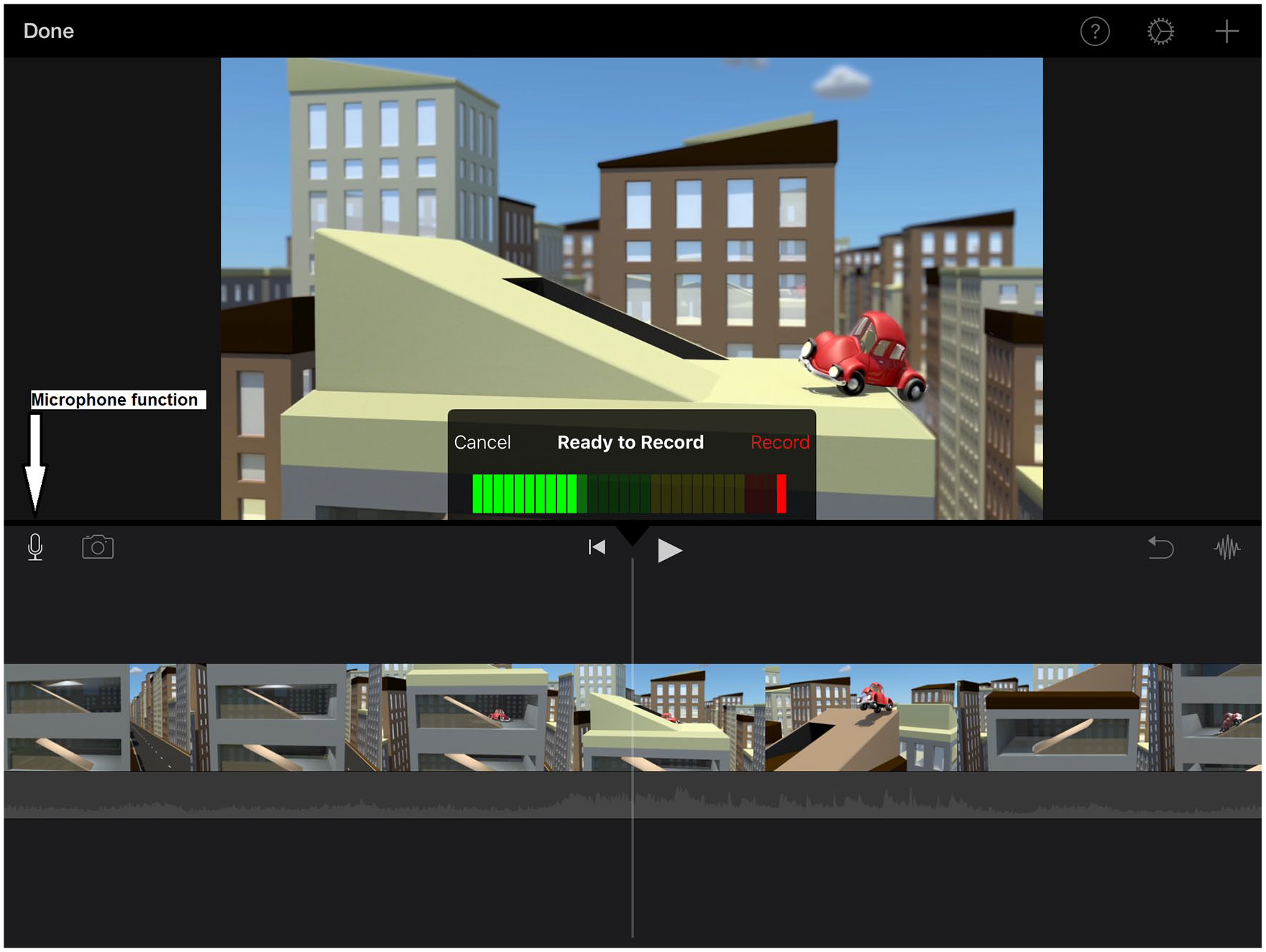
Note. Adapted for use in iMovie from “Jelly Cars, City Parking,” by Lee Caller (2016; https://vimeo.com/173108694). License at https://creativecommons.org/licenses/by/3.0
Students recorded themselves playing various instruments (e.g., the piano, xylophone, rain stick, and cabasa) and various sound effects (e.g., tearing a cardboard box, scraping a metal table, and sliding hands along a metal downpipe). iMovie allowed students to easily drag their audio recordings into a suitable position in relation to the video, as well as alter their recordings’ length, speed, and volume (see Figure 2). When finished, students exported their iMovie projects as mp4s, containing their recorded sounds, and uploaded them to the school’s portal page for marking and feedback. Each group was also asked to Air Drop their project to the teacher’s iPad, which allowed me to see how they had put their composition together. In addition to composing, iMovie was used as a reflective tool. This involved students importing their finished projects back into iMovie. Using the freeze tool, they then momentarily paused the video at several key points (see Figure 3). Following this, students used the microphone function to record themselves explaining scene by scene how they had used diegetic sound, nondiegetic sound, and the musical elements to create meaning in their respective compositions. When finished, each group exported their reflection as an mp4 and uploaded it to the school’s portal page.
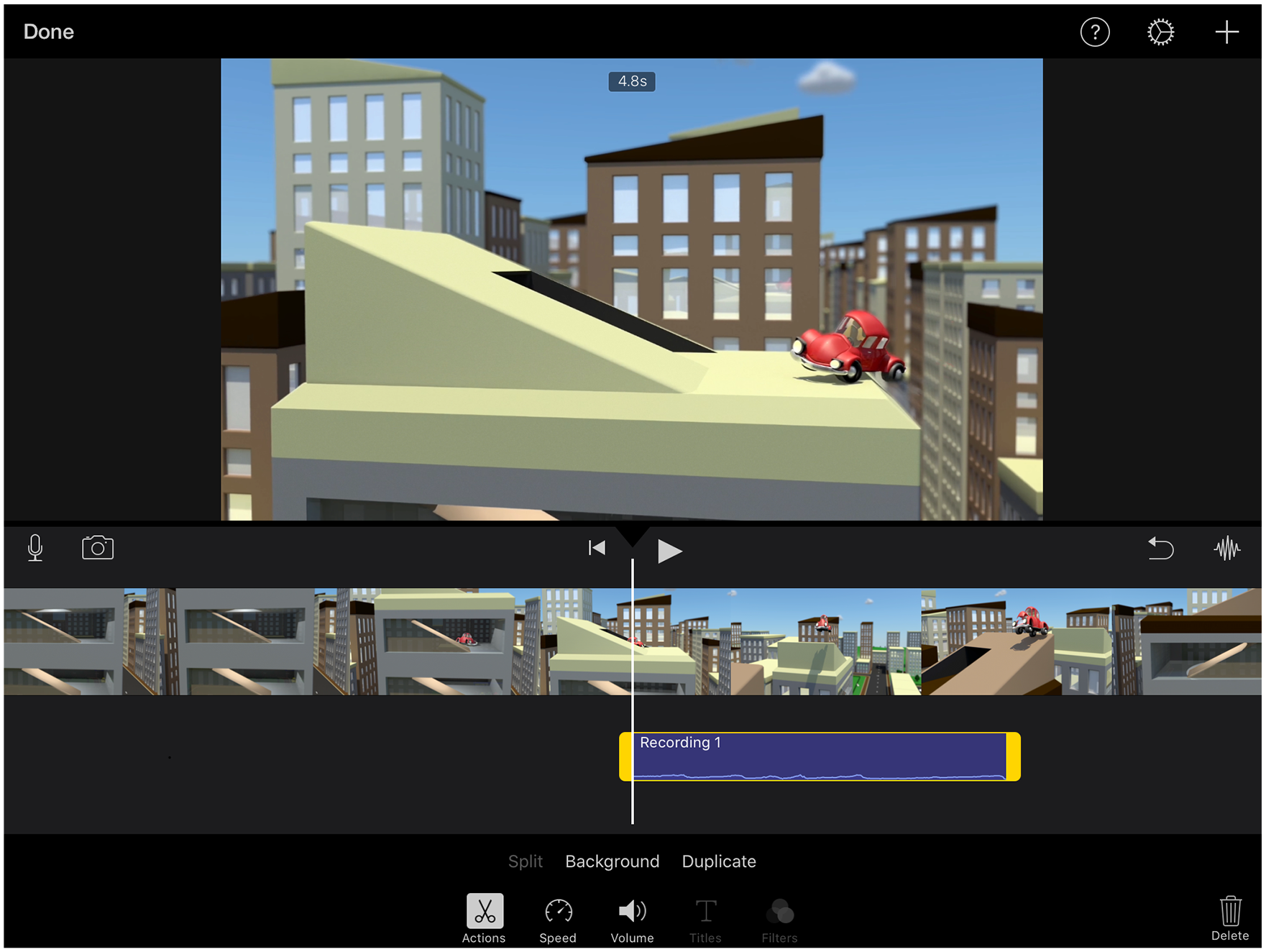
Note. Adapted for use in iMovie from “Jelly Cars, City Parking,” by Lee Caller (2016; https://vimeo.com/173108694). License at https://creativecommons.org/licenses/by/3.0
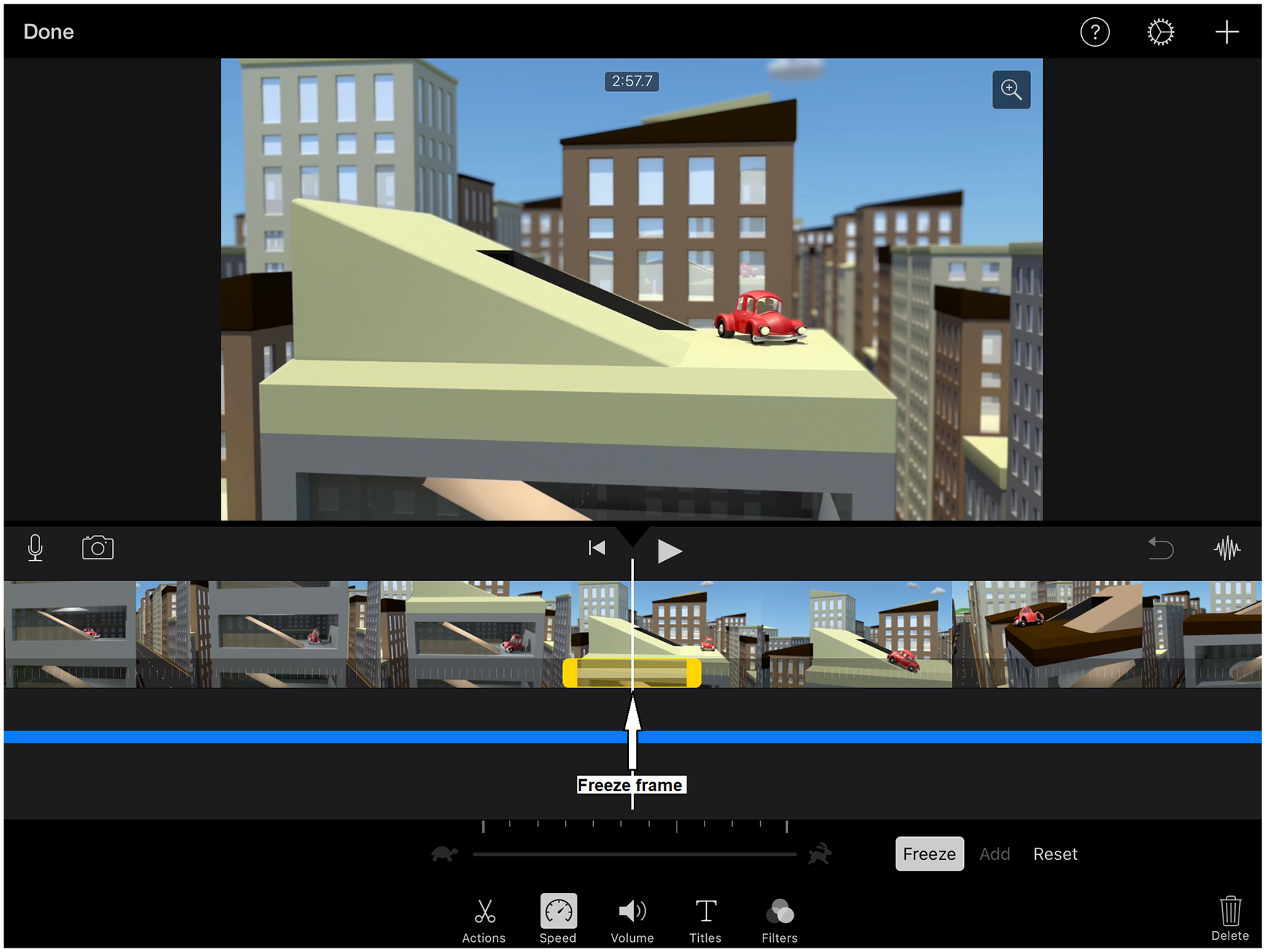
Note. Adapted for use in iMovie from “Jelly Cars, City Parking,” by Lee Caller (2016; https://vimeo.com/173108694). License at https://creativecommons.org/licenses/by/3.0
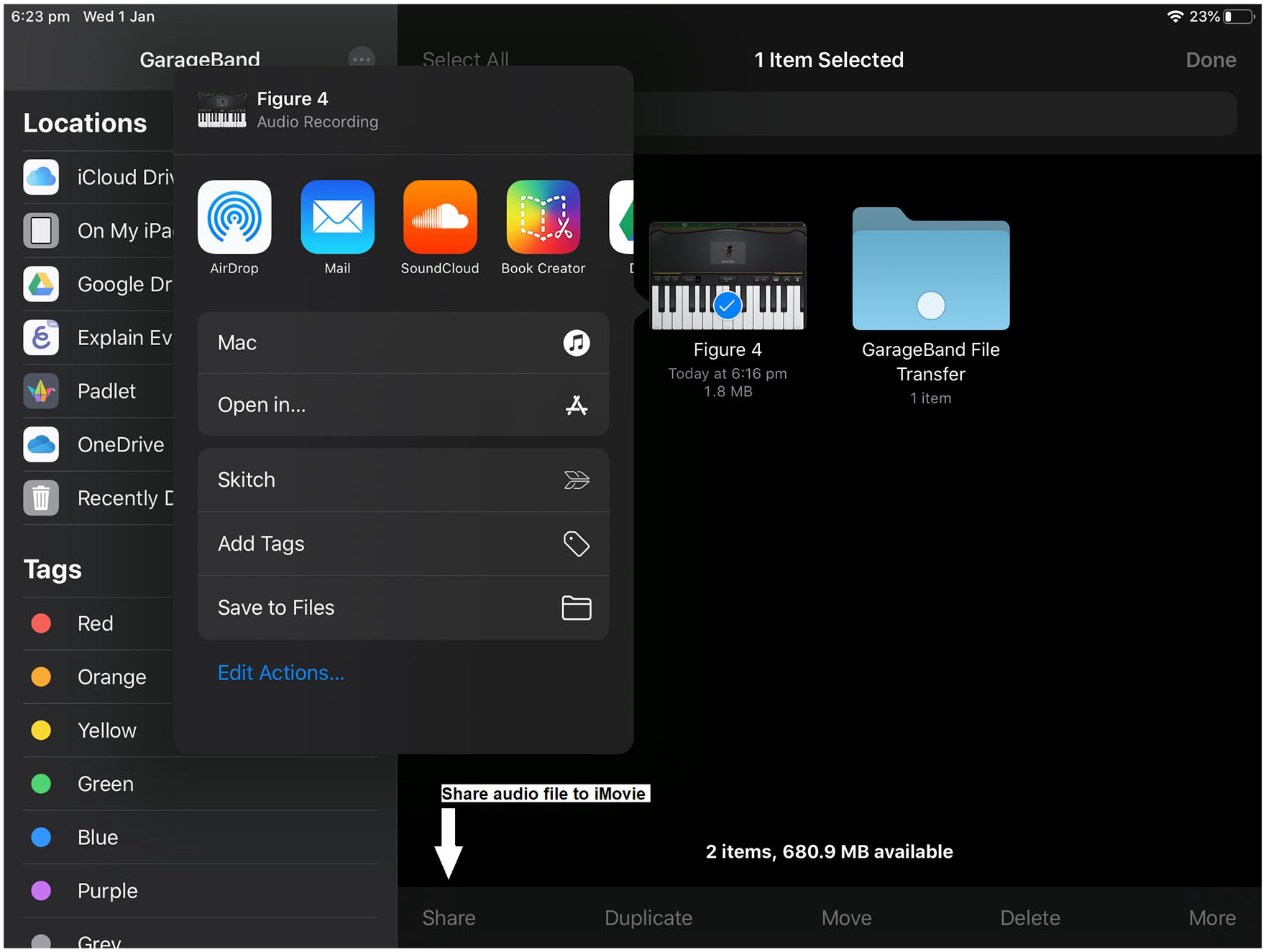
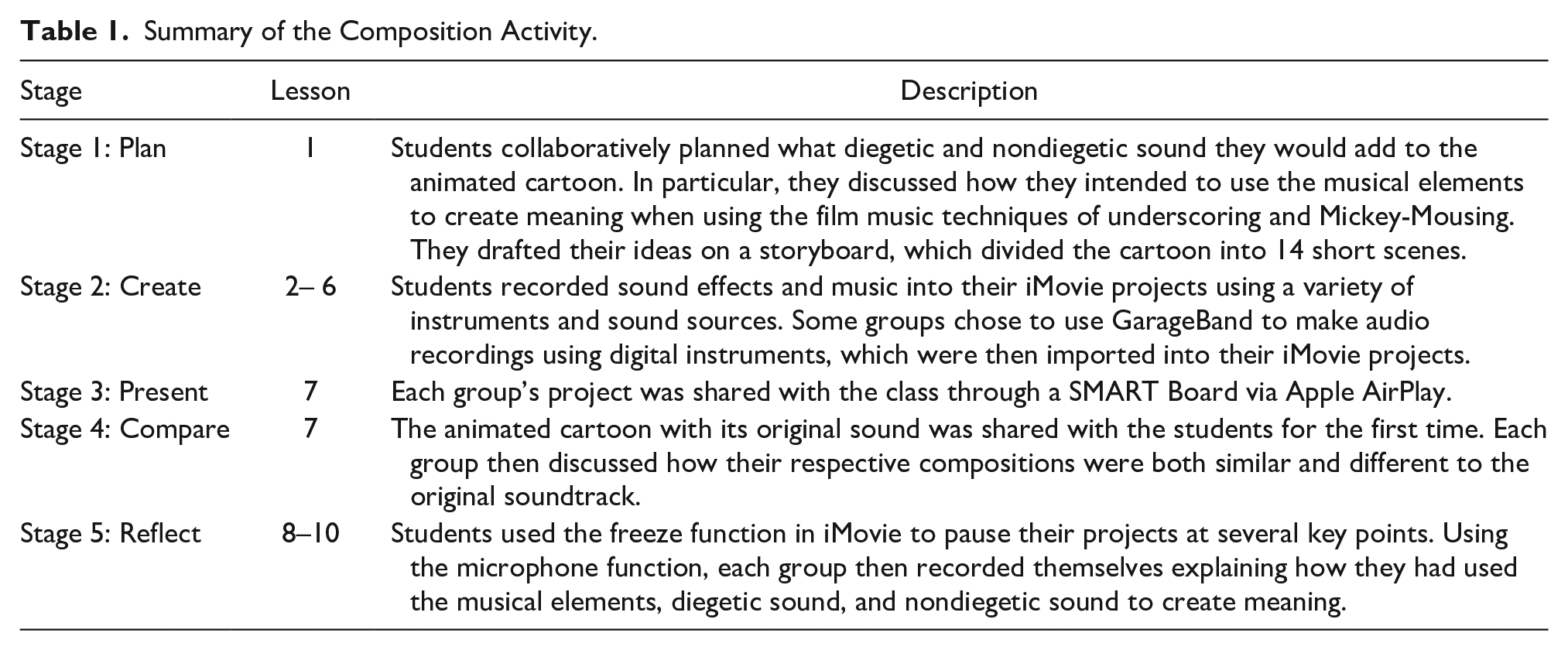
GarageBand was not used by all groups and was not required to complete the task. However, some students decided to use the digital instruments found in this app to make audio recordings, which they then exported into iMovie as audio files (see Figure 4). This allowed students to access a range of instruments and sound sources that were not available in the music classroom, such as the erhu and various synthesizers. To ensure that they composed all melodic and rhythmic material, students were asked not to use the Smart Instruments and Live Loops functions found within GarageBand. Decisions regarding what features of GarageBand are used when implementing this activity should be made at the teachers’ discretion and in negotiation with their students. This will depend on learning goals and practical concerns, such as space for groups to make live recordings simultaneously and available instruments. The process of this task is outlined below in relation to five stages: plan, create, present, compare, and reflect. The suggested number of lessons for each stage are also provided. Table 1 provides a summary.
Summary of the Composition Activity.
Stage 1: Plan
While students revised and planned how they would approach this activity throughout the entire process, the first lesson was devoted solely to this task. During this lesson, students were provided with an A3 sheet, which contained a storyboard separating the cartoon into 14 scenes. Using their iPads to view the cartoon, students spent the rest of the lesson discussing what diegetic and nondiegetic sound they would add to each scene. They were also encouraged to write how they would use the musical elements to create meaning when using the two film music techniques of underscoring and Mickey-Mousing. This was a collaborative, dynamic, and reflexive process. Students revisited their planning document multiple times throughout the following stages, particularly when creating and later when reflecting on the entire process. While students were planning, the teacher acted as a facilitator, visiting each group to ensure that they understood the task and providing guidance when necessary.
Stage 2: Create
The creating stage began during the second lesson and lasted for five lessons in total. Throughout this stage, students worked primarily outside the music classroom recording their sound effects and music into their iMovie projects. The teacher acted as both a facilitator and a consultant liaising with each group regarding their progress with the task. Each group was allowed back into the music room one at a time for a short period to use instruments that were not easily portable, such as the drum kit, digital piano, gongs, and bass xylophones. Having groups work primarily outside was necessary, as otherwise they would have interfered with each other’s recordings. This is a key advantage of the iPad, as its compact and portable design meant that taking it outside to make audio recordings was a relatively easy process when compared to devices like a laptop. Some students used GarageBand during this stage to make recordings and imported them into their iMovie projects. If indoor space and working outside are not feasible in your context, you may consider using GarageBand for the entirety of the creating stage of this activity, as it does not require the external microphone. Hence, multiple groups could create their projects in close proximity, without interfering with each other’s work. However, if possible, the use of both live and digital instruments is recommended.
Stage 3: Present
This stage was the shortest, taking only half a lesson. Students shared their completed compositions with the rest of the class through a SMART Board via Apple AirPlay. However, this could be done in several ways. Alternatively, the teacher could project students’ videos from a computer connected to a projector. Due to the upcoming reflection stage, students did not discuss how they had composed their work with the class. Rather, the focus of this stage was on premiering students’ completed compositions to their peers and applauding their efforts.
Stage 4: Compare
During this stage, the animated cartoon with its original sound was shared with the students for the first time. This occurred during the second half of Lesson 7, following the viewing of each group’s project. After watching and listening to the original version, the class discussed how their respective projects were both similar and different to the original composition. However, this could be done in multiple ways. For example, each group could discuss this independently and then report back to the class, or students could reflect individually before discussing their ideas with a student from another group in the form of a think-pair-share.
Stage 5: Reflect
This was the second most time-intensive stage, taking three lessons to complete. It involved students describing how they had used the musical elements to create meaning in their compositions and identifying how they had used both diegetic and nondiegetic sound, particularly the techniques of underscoring and Mickey-Mousing. This stage of the activity addressed the Australian Curriculum’s achievement standard for Years 5 and 6 and was used to assess students’ ability to “explain how the elements of music are used to communicate meaning in the music they listen to, compose and perform” (Australian Curriculum, Assessment and Reporting Authority, n.d.-b, para. 1). As discussed previously, students used the freeze function in iMovie to stop the video momentarily. These pauses generally followed the format of the initial planning document, which separated the cartoon into 14 scenes. Using the microphone function, each group then recorded their explanations for each scene. Students were easily able to adjust the length of time in which they paused the video so that it matched the length of their explanations. They were advised to spend at least the first lesson drafting their explanations, before recording their final versions into iMovie. Throughout this process, the teacher acted as a facilitator and provided feedback to each group.
Discussion
When reflecting on this activity and why it appeared to be successful in relation to student learning and engagement, I have several theories. In an article for the periodical Teaching Music, Criswell (2011) interviews William Bauer, a professor of music education at the University of Florida, who researches how technology can be applied to music teaching and learning (http://billbauer.net/about.html). When discussing the iPad, Bauer notes that “students who don’t have a traditional music background or who aren’t currently active participants in their school music program may stand to benefit the most from using tablet computers in music class” (Criswell, 2011, p. 32). Hence, Bauer considers the iPad to be an accessible educational technology for music learning. When implementing this activity, I found Bauer’s assertion to be correct, as I observed students, who generally lack engagement when undertaking more traditional music learning tasks, approach this activity with enthusiasm. Perhaps this is because the activity did not require students to have knowledge of traditional music notation, or expertise on an instrument, to be successful. Unlike private instrumental tuition, which parents pay an additional fee for in most Australian schools, all students in Year 5 had a similar level of experience with the iPad. These students were each issued their own iPad at the start of the year and had been using them across the curriculum in a variety of learning activities. Consequently, they began the activity with a similar level of prior knowledge.
With regard to its portable and functional design, being smaller than a laptop, it was easy for students to take their iPads outside. This was essential, as there was not enough space inside the classroom to allow for several groups to record simultaneously without interfering with each other’s work. Moreover, the touchscreen and intuitive nature of apps like iMovie and GarageBand allowed for audio and video to be edited easily and quickly. Very few students found it difficult to use these functions. The iPad also catered for those students who find writing challenging, as they were able to audio record themselves speaking for the reflection component of the activity. Hart (2018) notes that the touchscreen of the iPad offers a more natural, portable, and kinesthetic experience than a laptop computer and provides a range of interactive and versatile functions through its operating system and apps. Moreover, Hillier et al. (2016) note that iPads promote greater social interaction and collaboration than laptops when creating and performing music. While I did not try to complete this activity with laptops, I anticipate that it would have been a more complex process and overall less conducive to effective collaboration.
Also worth considering, is that students are generally quite adept at using tablet technology like iPads. I often observed them developing creative solutions to problems they encountered during the activity. As general music teachers, being unfamiliar with iPads should not be a deterrent to implementing activities like the one described in this article. Of course, one must know how to use these devices to some extent; however, you do not need to be an expert. I found the collective knowledge of students in my classes regarding iPads crucial to the teaching and learning process. The teacher does not need to be the fount of knowledge but rather needs to be a learner alongside their students who being digital natives have much to offer in this space. However, if students have had very little experience with iPads, then it may be necessary to allocate additional lesson time prior to beginning the project, so that they can familiarize themselves with the various functions of iMovie and GarageBand required for the task. If limited technology is available, a modified version of this activity can be implemented, in which students perform their compositions live with the chosen cartoon being played on mute on a projector screen.
Overall, the real-word nature of the activity, enabled by the portable, accessible, and functional design of the iPad, allowed for an engaging learning experience for both the students and the teacher. I am excited to see what impact iPads will have in music education over the coming decade, as these devices become more affordable and prevalent in general music classrooms. In sum, the iPad appears to have significant potential as both a compositional and a pedagogical tool in general music.
Footnotes
Authors’ Note
This article is submitted exclusively to General Music Today, and if accepted for publication, it is agreed that it will become the copyright of the National Association for Music Education.
Declaration of Conflicting Interests
The author(s) declared no potential conflicts of interest with respect to the research, authorship, and/or publication of this article.
Funding
The author(s) received no financial support for the research, authorship, and/or publication of this article.
