



Abstract
In this column, I discuss a soundscape composition activity that I implemented with primary/elementary music classes. During this activity, students used the iPad app, iMovie, to record, organize and edit sound to accompany photos of artworks that they had created. Overall, I found iMovie to be a useful app for music composition with general music classes.
In a previous article for this journal, I discussed a collaborative composition activity that involved students in Year 5 (10- to 11-year-olds) using iPads, namely, the apps iMovie and GarageBand (see Norman, 2021). When reflecting on this activity, I considered iMovie for iOS to have been particularly useful, due to its intuitive audio and video editing functions (Norman, 2021). Hence, I decided to extend my use of iPads to other year levels. The activity described in this column is based off a task that I implemented with Year 4 classes (9- to 10-year-olds) and involved students using iMovie to create soundscape compositions. For these compositions, students used triptych artworks, 1 which they had created during an inquiry-based history unit, as visual stimuli. However, this activity could be adjusted, so that it is suitable for other year levels.
iMovie for iPad (iOS)
iMovie for iOS allows students and teachers to create movies using photos, audio, and video files. To learn more about this app, visit the “iMovie for iPad” webpage on the “Apple Teacher Learning Center” website (see Apple, 2021). While several webpages/blogs explore possible uses of iMovie in music education (e.g., Burgemeister, 2013; Humberstone, 2017), very few primary studies address this topic (e.g., Cayari, 2015). Thus, my conclusions regarding the benefits of iMovie for general music education are based on what I have anecdotally observed. While teachers’ reflections on their professional experiences are valuable (Zeichner & Liston, 2013), I do recommend that further primary research is conducted in this area.
Students used the following functions in iMovie to create their soundscape compositions: trimming, transitions, photos, audio, and sharing. Trimming involves cutting video and/or audio files down to a desired length. These segments can then be rearranged within an iMovie project. Transitions involve blending the end of a video clip or photo with the start of another. Photos can be inserted into iMovie and will by default receive a pan-and-zoom effect, called the Ken Burns effect. However, this can be customized, so that specific details within a photo are focused on, or alternatively, this effect can be disabled. The audio feature allows students to record sound into iMovie using an iPad’s microphone. Furthermore, external audio files, produced through apps like GarageBand, can be imported. Once in iMovie, audio files can be edited in relation to their speed, volume, and length. When students have finished composing, they can use the sharing function to export their iMovie projects to video and/or AirDrop their work to another device.
Soundscape Composition
Schafer (1969) noted that “we are all in the world symphony” (p. 62) and that the term, “soundscape” can be “use[d] to describe the acoustic environment” that we find ourselves in at any given moment (Schafer, 1976, p. 5). Thus, as Yanko (2019) observed, a soundscape composition will contain “recognizable environmental sounds that invoke listeners’ associations, memories, and imaginations related to the soundscape” (p. 274). However, “music created through soundscape composition cannot be organised with much similarity to instrumental music; in fact, a broader definition of music such as ‘organised sound’ must be invoked if soundscape composition is to be included” (Truax, 2008, p. 105). I adopted such a definition when planning the soundscape composition activity described in this column. Furthermore, while students endeavored to create soundscape compositions that reflected the various sources of sound present in their artworks, I also encouraged them to consider how they could create a mood/atmosphere for their artworks through instrumental music. However, this aspect of the task did prove challenging for most groups. Overall, I adopted a flexible approach to soundscape composition due to the addition of instrumental music and because students were, in most instances, attempting to recreate, rather than record, actual environmental sounds.
The Composition Activity
Introducing soundscape composition to primary/elementary students can be challenging, as in most cases students will need to reconsider their perspectives on what constitutes music. Hence, I recommend using visual stimuli when composing in this style or genre of music. One of the advantages of iMovie for iOS is that photos and/or video files can be easily imported into projects, providing visual stimuli for music composition. While iMovie can be used for soundscape composition in several ways, below I outline the stages of an activity that involved Year 4 students using triptych artworks as visual stimuli. 2 In these artworks, students depicted Australia in relation to the past, present, and future.
Stage 1: Setting Up the Project
The first stage involves students bringing their triptych artworks to the music classroom. Following this, they should form small groups and within these decide whose artwork they would like to use as a visual stimulus. Each group should then take photos of their chosen artwork and input these into a new iMovie project. Students can then alter the amount of time spent on each image and customize, or remove, the default Ken Burns effect. The transition effect between each of the three images can also be adjusted. Figure 1 shows an iMovie project with images embedded. Please note that I have used Creative Commons images, depicting Flinders Street Station in Melbourne, as I no longer have access to students’ work. Furthermore, as the images below do not convey this, it is important to acknowledge “the Traditional Custodians of the land, the Bunurong Boon Wurrung and Wurundjeri Woi Wurrung peoples of the Eastern Kulin Nation” for whom “Melbourne has always been an important meeting place” (City of Melbourne, n.d., paras. 3–4).
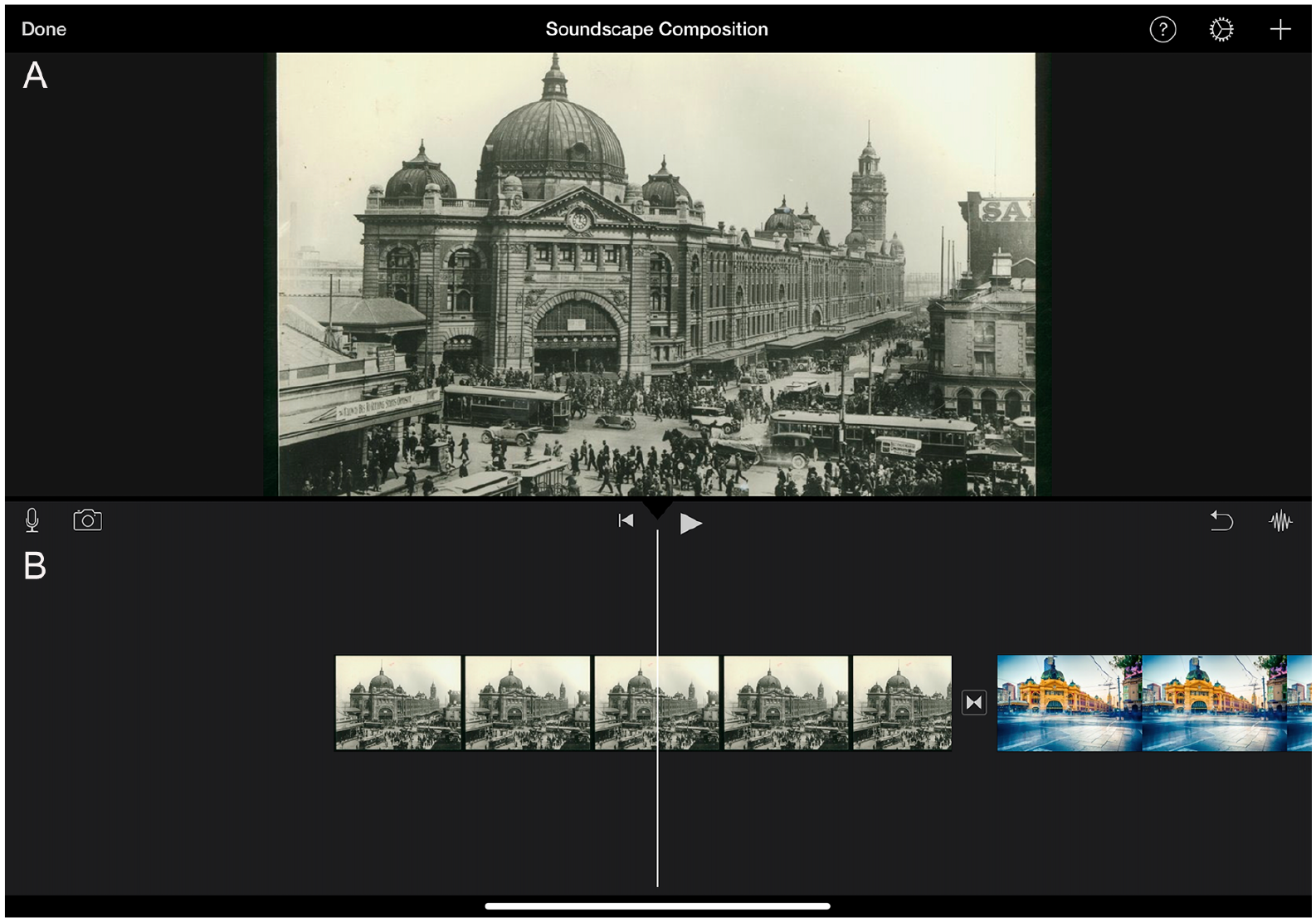
(A) Adapted for use in iMovie from “State Library Victoria Collections: Flinders Street Station” by Unknown (c.1929). License at https://creativecommons.org/licenses/by/2.0/; (B) Adapted for use in iMovie from “Flinders Street Long Exposure” by Scott Cresswell (2014). License at https://creativecommons.org/licenses/by/2.0/.
Stage 2: Planning
Stage 2 involves students planning what sounds, and possibly music, they would like to use in their soundscape compositions. To do this, each group should brainstorm what sound sources are visible in their chosen artwork (cars, birds, people, trains, etc.) and how they could create similar sounds using instruments and/or objects at school. The teacher may also suggest that students bring in objects from home for this purpose. Students may also decide to use the sound effects included in both iMovie and GarageBand. See Norman (2021) for details regarding how to export audio from GarageBand to an iMovie project. Regarding instrumental music, each group may want to consider what moods/atmospheres are implied in their chosen artwork and how they could compose music to reflect these. However, this is quite challenging and teachers may wish to omit this aspect of the activity. During this stage, the teacher should act as a facilitator who offers guidance and support.
Stage 3: Recording
Stage 3 involves students creating and recording sounds, and possibly music, for the three scenes in their triptych artworks. To record, students will need to use the microphone function in iMovie (see Figure 2). Students can edit audio recordings in relation to their speed, volume, and length. Recordings can also be cut, copied, and repositioned. To create thicker textures, multiple audio recordings can be overlapped (see Figure 3). Students can also add prerecorded sound effects using the sound libraries in iMovie and GarageBand. During this stage, the teacher should organize the logistics of the activity so that students have equal access to the equipment and avoid interfering with each other’s recordings, as much as is practicable. This stage will likely take several lessons and the teacher should provide frequent formative feedback to each group.
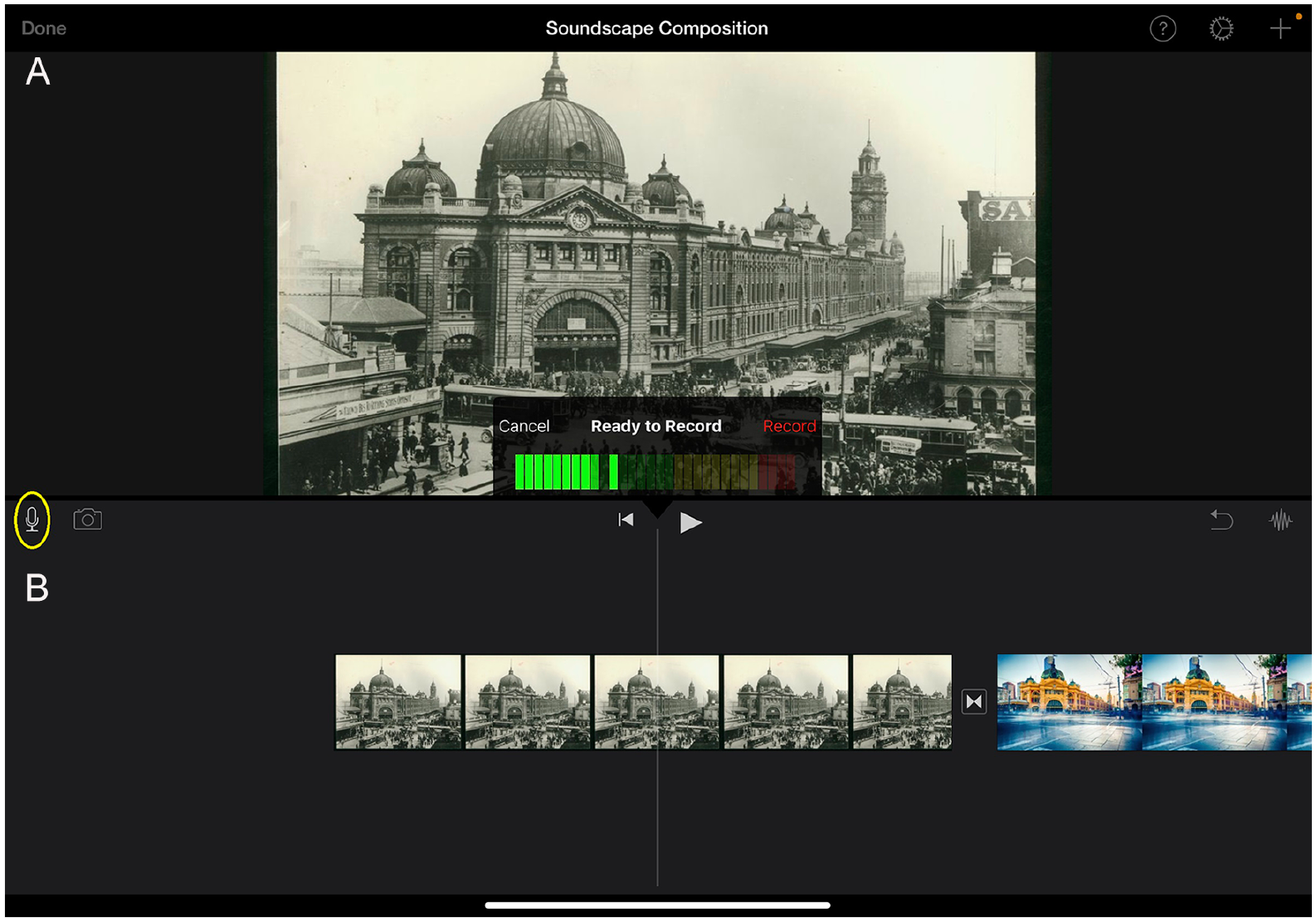
(A) Adapted for use in iMovie from “State Library Victoria Collections: Flinders Street Station” by Unknown (c.1929). License at https://creativecommons.org/licenses/by/2.0/; (B) Adapted for use in iMovie from “Flinders Street Long Exposure” by Scott Cresswell (2014). License at https://creativecommons.org/licenses/by/2.0/.
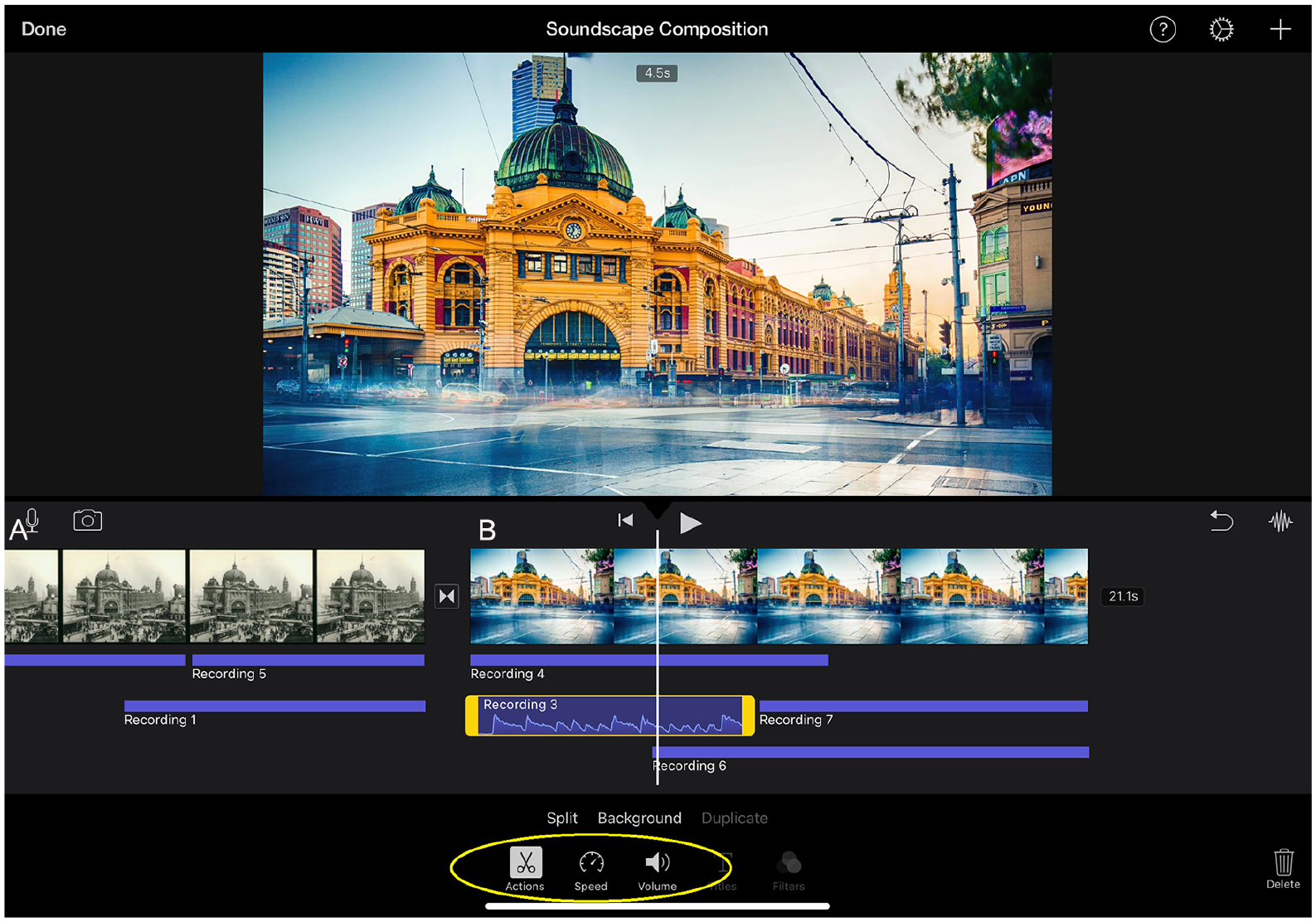
(A) Adapted for use in iMovie from “State Library Victoria Collections: Flinders Street Station” by Unknown (c.1929). License at https://creativecommons.org/licenses/by/2.0/; (B) Adapted for use in iMovie from “Flinders Street Long Exposure” by Scott Cresswell (2014). License at https://creativecommons.org/licenses/by/2.0/.
Step 4: Sharing and Reflecting
The final stage involves students both sharing their compositions, with their teacher and peers, and reflecting on the compositional process. Students can either export their iMovie project to video or AirDrop their project to their teacher’s iPad (see Figure 4). While the former will allow students’ work to be viewed on a variety of devices, I suggest the latter, as iMovie projects act somewhat as a digital score (see Figure 3). Through viewing these “scores,” the teacher may gain additional insight into each group’s compositional process, which may assist with marking. The teacher should organize a viewing of each group’s soundscape composition. I suggest using Apple AirPlay; however, there are other ways of doing this. Following the presentation of each group’s composition, the teacher and class may provide feedback. Furthermore, the teacher should encourage students to reflect on the compositional process and consider what they would do differently if they were to revisit the task. There are many ways in which students can both share and reflect on their creative work. What is important is that students are given the opportunity to do these things during this activity.
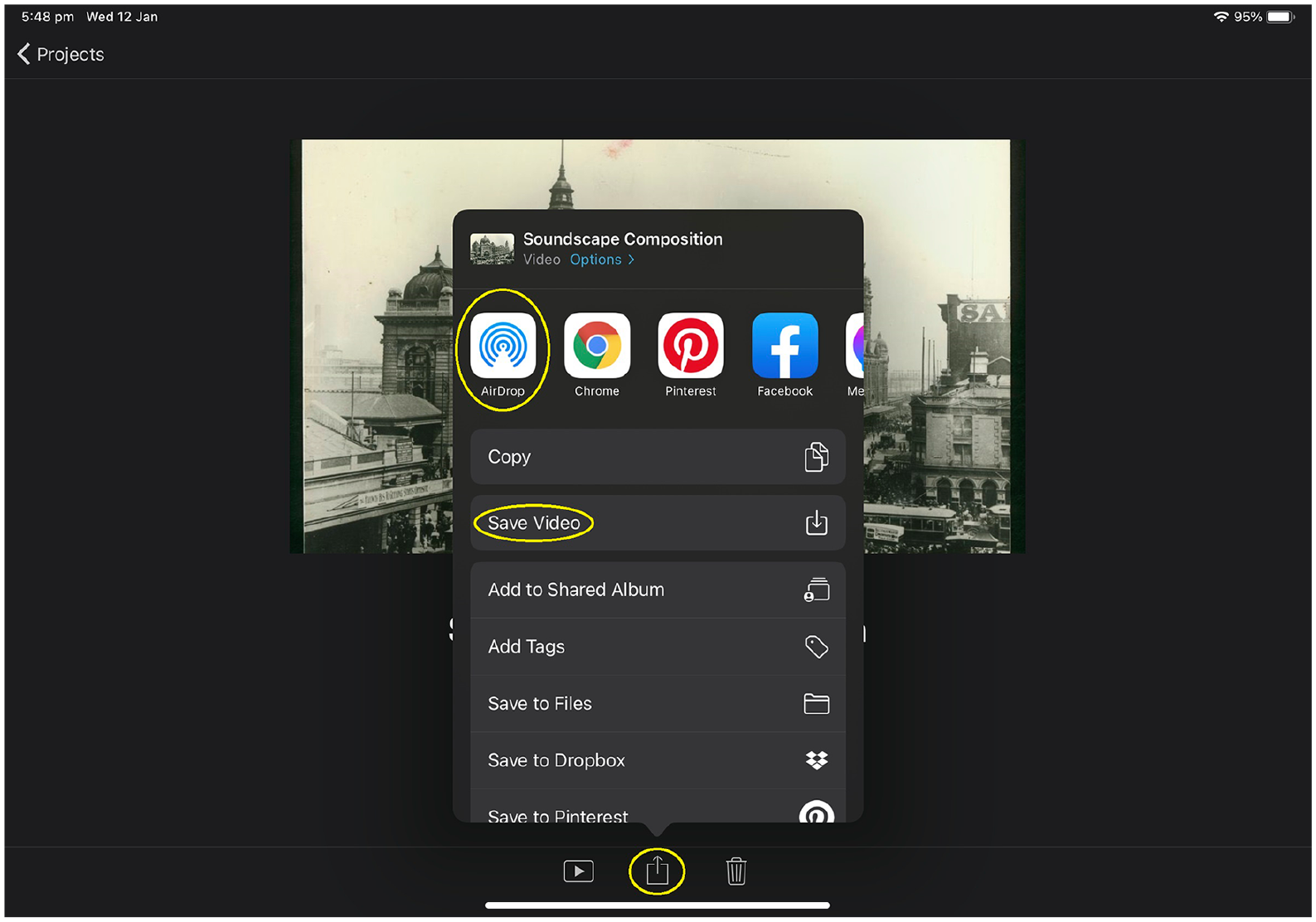
Adapted for use in iMovie from “State Library Victoria Collections: Flinders Street Station” by Unknown (c.1929). License at https://creativecommons.org/licenses/by/2.0/.
Discussion
In this column, I have described a soundscape composition activity for general music classes that involves iMovie for iPad (iOS). Both iMovie and soundscape composition appear to have several benefits for general music education. Koops (2013), in a book chapter exploring music composition in instrumental settings, noted that “soundscapes are a great way to start [composing] because there are no notation limits or requirements” (p. 154). I concur, as I observed in my general music classes that the lack of traditional music notation, coupled with the focus on creating and arranging environmental sounds, helped to make this task accessible to most students. Furthermore, Koops (2013) noted that for students, “recording and playing back their music is a vital part of the composing process” (p. 154). This, in my opinion, is one of the greatest advantages of iMovie for iOS, as students are easily able to record their compositional ideas, review what they have made, and edit audio files. As the iPad is such a portable device, composition activities, like the one described in this column, can occur in both indoor and outdoor spaces. This is particularly important when students are sampling sounds. Moreover, it allows them to utilize spaces so that they do not interfere with each other’s recordings. Soundscape composition also does not require a large storeroom of equipment. A single iPad can be shared between a group of students, which, considering school budgets, is beneficial when teachers have limited access to these devices.
In a previous article for this journal, I discussed a music composition activity that involved students using the apps of iMovie and GarageBand to compose music for an animated cartoon and concluded that “the portable, accessible, and functional design of the iPad, allowed for an engaging learning experience” and that “the iPad appears to have significant potential as both a compositional and a pedagogical tool in general music” (Norman, 2021, p. 11). I still very much agree with these statements. In my experience, when iMovie for iOS is effectively incorporated into composition tasks, students are afforded the opportunity to engage in a cyclic process of composing, recording, and refining, which may otherwise be limited by traditional music notation. However, I do recommend that further study is conducted in this area, as this conclusion is based solely off what I have observed during my own teaching practice. In sum, I have found iMovie to be both a useful and intuitive app that has several advantages for music composition in general music education.
Footnotes
Declaration of Conflicting Interests
The author(s) declared no potential conflicts of interest with respect to the research, authorship, and/or publication of this article.
Funding
The author(s) received no financial support for the research, authorship, and/or publication of this article.
